
A folder of HTML files can contain a convincing design without containing a working website. A contact form may be only markup. A payment button may point nowhere. A language switcher may change a label while leaving the rest of the page untouched.
Before I estimate an HTML or AI-generated website conversion to WordPress, I would review both the design and the behavior. The aim is to make the site editable and dependable while preserving the parts that already work. Here is the planning process I would use.
Illustrative example: the one-page service website described below is a demonstration, not a client project or a claim of measured results.
1. Review the complete export, not just a screenshot
I would request the HTML or PHP files together with CSS, JavaScript, fonts and images. A ZIP export is helpful because it preserves the asset structure. If the source depends on external packages or a build process, I would also need the relevant dependency information.
I would inspect unfamiliar files before running them. A PHP extension does not tell me what the file does. It may contain a template, a form handler or a dependency on another system. The review should identify those responsibilities before choosing an implementation.
For the demonstration site, I would list every section, interactive control and destination. I would record missing assets, placeholder content and external embeds. I would also confirm that the business has permission to use the supplied images and fonts.
2. Turn visible features into a behavior inventory
| Source element | What I would inspect | WordPress requirement |
|---|---|---|
| Contact form | Fields, handler, validation and delivery | A working form with verified feedback and recipient settings |
| Live chat button | Actual provider embed or placeholder | Approved integration and mobile overlap checks |
| Package card | Enquiry link or genuine purchase flow | Agreed enquiry or payment implementation |
| Language selector | Complete translations or visual-only control | Defined language pages and update process |
| Gallery or slider | Dependencies and touch behavior | Maintainable editing and accessible navigation |
This inventory prevents an inaccurate “one page” estimate. One long page with several integrations may require more work than three short information pages. I would quote the actual sections, functionality and verification requirements.
If a contact form is absent, I would explicitly include its design and setup as new work. If the form exists visually but has no delivery mechanism, I would describe that distinction. My contact form email guide explains why a success message alone is not enough evidence.
3. Decide what the owner should be able to edit
“Editable in WordPress” needs a definition. I would ask whether the owner needs to replace text and images, reorder sections, add service cards or create new pages. These are different levels of editing freedom.
For the illustrative service page, a sensible content map might include the hero heading, introductory text, service cards, selected work, FAQ entries and enquiry details. Shared styling can remain controlled so routine content changes do not accidentally alter the whole design.
I would identify repeated content early. A portfolio with many entries may need structured records rather than separate hand-built blocks. A simple page with a few stable sections may not need that extra structure. The choice should follow the editing task.
4. Choose Elementor or a custom implementation deliberately
I would choose Elementor when visual editing is a central requirement and the design can be represented cleanly with the available components. I would confirm which features require Pro or an add-on before including them in a quote. A free editor does not mean every requested feature is included.
A custom theme or structured field approach may suit repeated content and stricter layout control. It needs its own documentation and maintenance plan. My Elementor versus custom theme comparison covers that decision in more detail.
I would avoid presenting a page pasted into one HTML widget as a fully editable Elementor conversion. That can be appropriate for a small embedded component, but the owner still needs code editing for its content. The delivery should state what is editable through controls and what requires a developer.
5. Integrate assets through the WordPress structure
For a custom theme, I would use WordPress’s supported asset-loading approach instead of scattering duplicate script tags across templates. The official Including Assets guide describes enqueueing styles and scripts. I would also review dependencies so a slider or animation does not load the same library twice.
Images need appropriate dimensions, meaningful filenames and accessible alternative text where they convey information. Fonts need valid licences and a loading plan. I would compare the implementation with the source at agreed viewport sizes rather than assume identical desktop appearance proves responsive behavior.
I would inspect unusually large bundles and decorative animations before carrying them over unchanged. The right decision may be to simplify a component, but that should be agreed as a design change rather than quietly removed during conversion.
6. Plan URLs and content migration before launch
I would inventory the current public URLs, titles and important downloads. If an existing address can stay the same, that usually makes the move easier to understand. When it changes, I would create a specific redirect map rather than send every old URL to the homepage.
I would separately check internal navigation, image URLs and external links. A copied source can retain development-domain references or paths that only work from the original folder. These are easy to miss when the homepage is the only page reviewed.
The website migration SEO checklist provides a broader launch review. Preserving metadata and URLs helps manage the move; it does not guarantee unchanged search rankings.
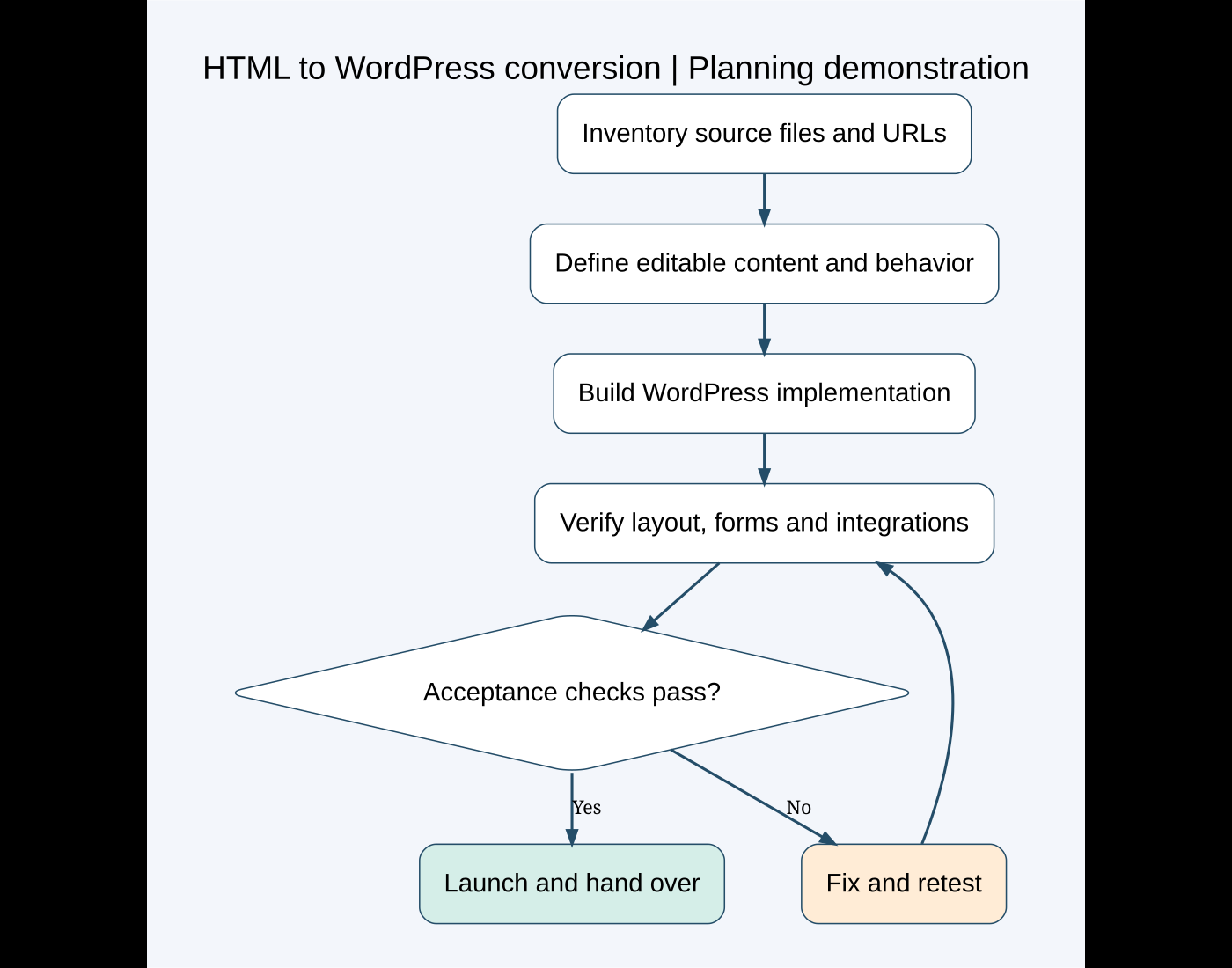
7. Define acceptance checks before development
I would agree on the content and functionality included, the supported languages, the expected editing controls and the browsers or devices relevant to the project. Screenshots can help define visual expectations, while a task checklist defines behavior.
- All agreed sections and supplied content are present.
- The owner can perform the promised edits without changing code.
- Menus, anchors and buttons reach their intended destinations.
- Forms accept valid entries, explain errors and deliver to the approved recipient.
- Chat and payment integrations follow the agreed setup and testing process.
- Mobile layouts and text zoom do not hide important controls.
- Language pages, metadata and old URL handling are checked.
- Backups, maintenance responsibilities and handover instructions are recorded.
I would perform these checks on staging and repeat the essential visitor tasks after launch. My staging guide explains why the test copy and deployment plan matter.
What affects the estimate?
The main factors are section count and complexity, asset quality, editing requirements, custom interactions, integrations, languages and migration scope. A clean export with final content reduces uncertainty. An AI prototype with unfinished behavior needs more investigation.
I would separate the conversion from optional additions, such as a new contact form, a new payment flow or additional language pages. That gives the business a reviewable scope and avoids surprises later.
If you have an HTML, PHP or AI-generated design ready for WordPress, send the complete export and the features you need. I can review what is already available, identify missing functionality and prepare a clear plan, cost and timeline.
Featured photo: Christopher Gower on Unsplash. Diagram created for this article. Technical reference reviewed October 7, 2026.
Need implementation help?
Turn the technical fix into a reliable production solution.
If this article describes a problem you are dealing with, I can review the current setup, identify the right implementation path, and build or fix it without adding unnecessary complexity.