
A migrated WordPress site can look correct on its new server while important pages redirect to the wrong place, canonical tags still mention staging, or a launch-time indexing restriction remains active. I would check those details before calling the move complete.
This checklist is for planning and verifying a WordPress migration, whether you are changing hosts, rebuilding a site or moving to a new domain. It does not promise unchanged rankings. The examples are illustrative, not claims about a specific client migration.
1. Separate a hosting move from a URL change
Start by writing down what changes: hosting, domain, protocol, URL paths, content, design and platform. A host-only move with the same public URLs is not the same project as changing the domain and permalink structure.
Google provides separate guidance for hosting changes without URL changes and moves with URL changes. I would choose the appropriate plan rather than create redirects or use a change-of-address workflow simply because the server changed.
Where possible, I would avoid combining unnecessary changes in one release. A new host, rewritten service pages and a new URL structure make it harder to explain a problem afterward. If they must ship together, document each decision and its verification evidence.
2. Inventory the URLs and business journeys that matter
Before building the replacement, collect a URL list from the current crawl, sitemap, WordPress content and available Search Console or analytics evidence. Include important downloads, image URLs where relevant, landing pages and translated versions. One source rarely tells the complete story.
I would prioritize pages with inquiries, orders, meaningful search impressions, external links or operational value. Do not assume that a page with few clicks has no purpose; it may support existing customers or a specialist buying decision.
| Inventory field | Why I would record it |
|---|---|
| Current URL and response status | Establishes what is live before the move |
| Intended new URL or retirement decision | Prevents improvising redirects at launch |
| Title, description, H1 and canonical | Provides a comparison for the new output |
| Language and related translated URLs | Helps preserve multilingual relationships |
| Primary visitor action | Connects technical checks to the site’s business purpose |
| Priority and decision owner | Makes unresolved questions visible before release |
Capture the date range for any performance baseline. I would not compare one quiet weekday with a busy seasonal campaign and attribute the difference entirely to the migration.
3. Give every old URL an intentional destination
Illustrative mapping: imagine a business replacing an older service section. This table describes decisions, not rules to paste into a live server:
| Old URL | Decision | Expected result |
|---|---|---|
| /services/wordpress/ | Keep the address | 200 with the intended WordPress service content |
| /wp-support.html | Move to /services/maintenance/ | Permanent redirect to that relevant equivalent |
| /old-promotion/ | Retire; no suitable replacement | Intentional 404 or 410, not an unrelated homepage redirect |
| /fr/services/ | Retain the French page | French content and consistent language relationships |
Google’s redirect documentation describes permanent server-side redirects such as 301 and 308. I would use the appropriate permanent redirect for a permanent move and test its destination. Avoid chains where an old URL redirects through another old address before reaching the final page.
A redirect is a routing decision, not permission to discard the visitor’s intent. Mapping every removed product or service to the homepage makes the experience confusing. If there is no relevant replacement, make the retirement deliberate and provide useful navigation on the error page.
My WordPress URL redirect guide covers implementation considerations. For migration acceptance, I would verify the map regardless of which supported tool implements it.
4. Check rendered content and SEO output on staging
I would compare representative templates, not just the homepage: a service page, blog article, product, category, translated page and any custom content type the business uses.
Read the public HTML and visible page. Confirm the intended title, description, headings, canonical, important text, links and images. A value saved in an SEO plugin is not enough if a theme or integration outputs something different.
Google’s canonical guidance explains how preferred URLs are signaled. I would check that production pages do not point to a staging hostname, and that redirects, internal links and sitemap URLs support the intended public destination.
For multilingual sites, verify each language’s live URL, language switcher and relevant alternate-language annotations. My multilingual Elementor guide discusses maintaining the layouts alongside translated content.
Protect staging from public exposure and use an intentional indexing policy. Google notes that a crawler must be allowed to access a page to see its noindex instruction; robots.txt blocking is not the same mechanism. At launch, verify the production site’s actual response and HTML rather than assume a staging restriction was removed everywhere.
5. Test the URL map mechanically and inspect the results
I would run a crawler or HTTP checks against the prepared map and retain the results. For each old address, capture the first status, redirect target, final status and final URL.
The acceptance questions are practical:
- Does each retained page return the intended content?
- Does each moved URL reach its relevant final destination?
- Are redirect loops and unnecessary chains absent?
- Do HTTPS and the chosen hostname resolve consistently?
- Do internal links go directly to the intended public URLs?
- Are deliberately retired URLs distinguished from accidental missing pages?
For a host-only move, test the new environment before the public DNS change using a suitable preview method that preserves the intended hostname. Note that a temporary preview address can behave differently for cookies, certificates and canonical generation.
I would also test a representative sample manually. A final 200 response is not enough if it contains an unrelated page, a security challenge or a generic “not found” message.
6. Plan the final data transfer, not just the files
A WooCommerce store can receive new orders while the migration copy is being prepared. Decide how orders, customers, stock changes and form inquiries created during that interval will be preserved. A full database overwrite from an older staging copy can lose that activity.
I would document who controls the cutover, what activity must pause if any, which data is transferred last and how the team reconciles records. The process depends on the hosting and migration method; an old backup is not automatically a safe rollback for a live store.
Check integrations too: outgoing webhook endpoints, incoming callback URLs, mail configuration, scheduled jobs and credentials tied to a domain or environment. A website that loads but stops sending inquiries has not passed a business migration test. Use the contact-form email checklist to verify actual receipt.
7. Use a short launch gate with named owners
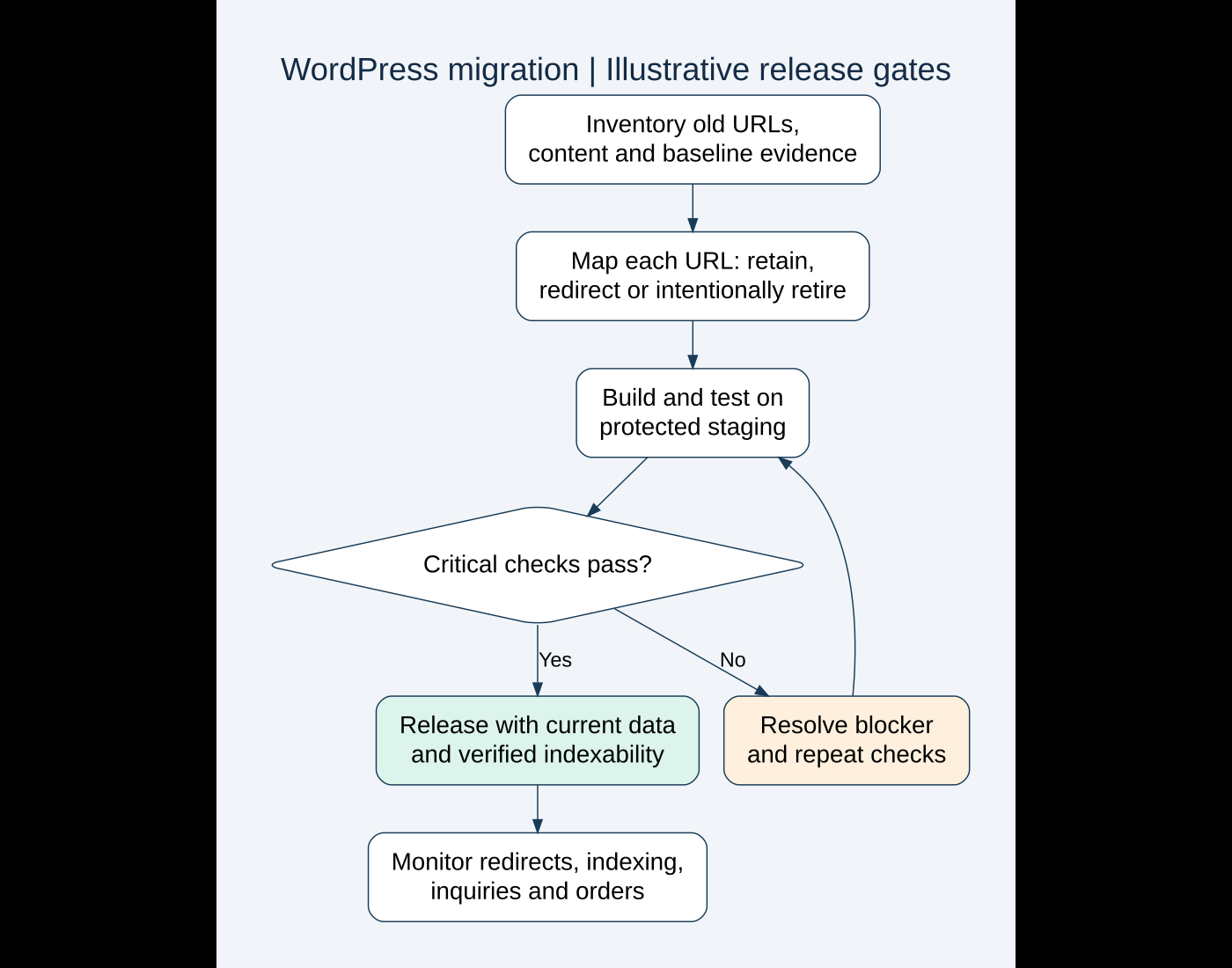
Before public cutover, I would ask the responsible people to sign off on a compact list. Keep critical blockers distinct from cosmetic follow-up work.
- Current backup and recovery procedure are understood.
- Final content and transactional data are accounted for.
- HTTPS, hostname and critical redirects behave as planned.
- Production pages have the intended indexability and canonical output.
- Important navigation, forms, checkout and integrations pass their checks.
- Sitemap output lists the intended public URLs.
- Monitoring access and post-launch responsibilities are assigned.
Google’s move guidance recommends maintaining redirects for at least a year for URL-changing moves. I would include ownership of the old domain and redirect hosting in the plan so those redirects do not disappear when an old account is cancelled.
8. Monitor technical failures and business outcomes separately
After launch, I would inspect a fresh crawl, server errors and critical visitor journeys, then use Search Console to follow indexing and search performance. Submit the appropriate sitemap and use URL Inspection to investigate selected important pages. Use the Change of Address tool only for a qualifying domain move, not every redesign.
Watch old and new URLs where applicable. Search visibility may fluctuate while pages are recrawled, so do not promise that a migration will preserve every ranking or immediately improve traffic.
I would keep a dated issue log with URL, symptom, evidence, owner and resolution. A broken redirect needs a technical fix. A retained page with reduced inquiries may need further investigation into content, tracking, demand or usability rather than another redirect.
AI can help organize a fictional migration checklist or flag missing columns in a redacted URL map. I would not let it invent destinations or approve a map without reviewing the actual pages and crawl results.
If you are moving a WordPress site and want a clear plan before launch, send me the current site, planned changes and target date. I can help define the URL map, verification gates and operational handover without turning a simple hosting move into unnecessary redesign work.
Official technical references reviewed on October 16, 2026. Featured stock photograph: Kari Shea on Unsplash. The mapping examples and workflow are illustrative, not client migration results.
Need implementation help?
Turn the technical fix into a reliable production solution.
If this article describes a problem you are dealing with, I can review the current setup, identify the right implementation path, and build or fix it without adding unnecessary complexity.