
A contact form says “Thank you,” but the inquiry never reaches your inbox. I would investigate that as a chain of separate events: the browser submits the form, the form accepts it, WordPress hands off a notification, the mail provider processes it and the receiving mailbox decides what to do with it.
Replacing the form plugin before finding the failed step can leave the same problem in place. Here is the practical sequence I would use to diagnose missing WordPress contact-form emails and verify a repair. The scenario below is illustrative, not a report of a client incident.
A success message does not prove inbox delivery
WordPress explicitly warns that a successful wp_mail() return does not mean the recipient received the message. That distinction matters when a form or mail log says “sent.” Check what that label actually represents: form acceptance, mail handoff or a provider event. See the WordPress wp_mail reference.
I would begin with one controlled test, not several changes at once. Give the message a unique subject such as “Website form test — A17,” note the submission time and timezone, and record the form URL and intended recipient. Use harmless test details instead of a real customer’s message.
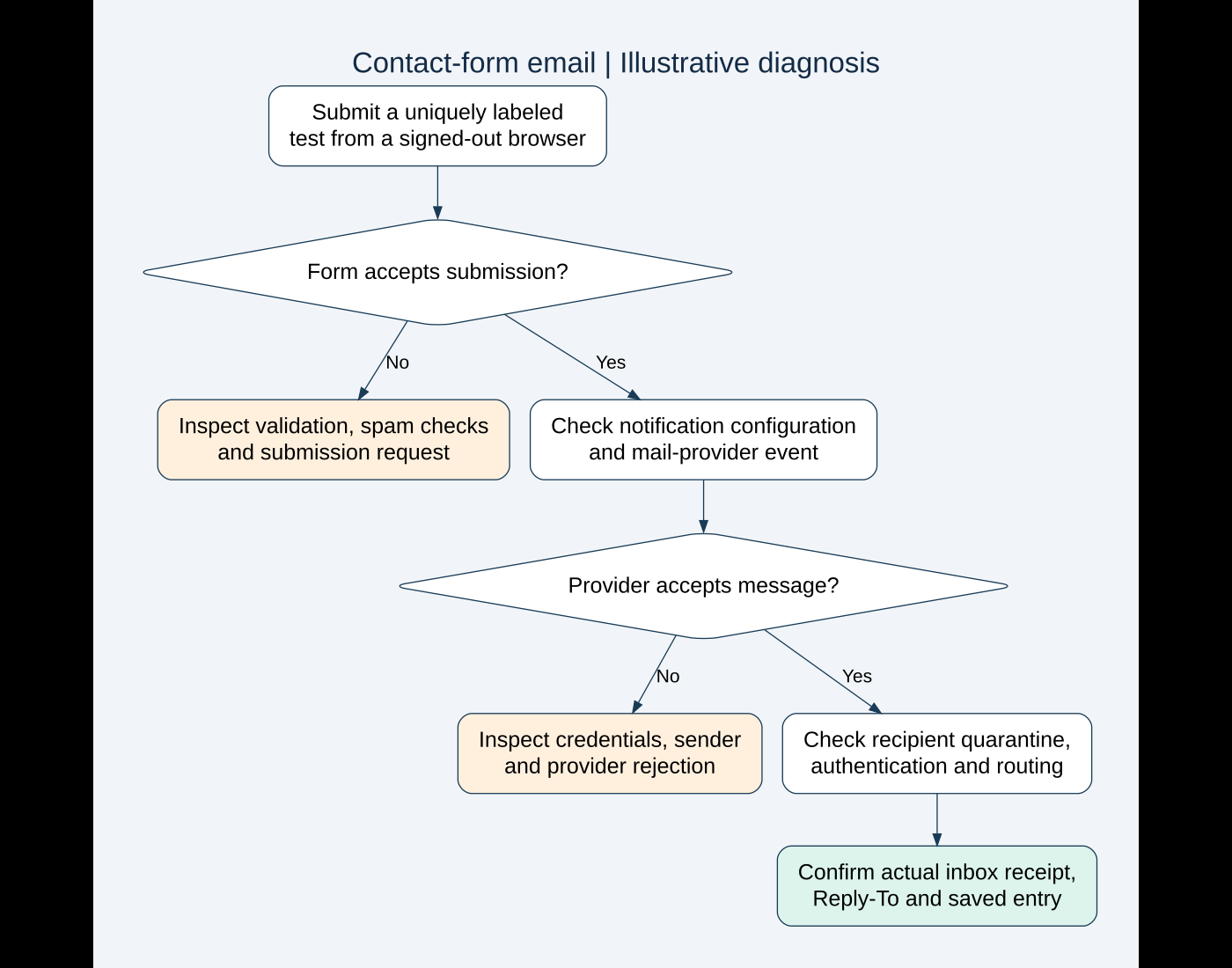
1. Check the actual form submission
Open the page in a signed-out browser and submit the uniquely labeled test. Then repeat on mobile if that is where visitors report trouble. Write down the exact response rather than assuming a green box means everything worked.
If the page shows validation errors, hangs or never confirms submission, I would inspect the browser console and the submission request in the Network panel. Look for its response status and the form plugin’s response details. A blocked request needs a different investigation from a notification rejected by a mail provider.
Check whether spam protection, a firewall rule or a recent JavaScript optimization changed the submission behavior. Test one suspected cause on staging and restore any temporarily relaxed protection. I would avoid disabling every security layer on the live contact page just to see what happens.
A reproduction note should include the browser, device, page, field values used for the harmless test and visible response. That makes a plugin-support request far more useful than “the form is broken.”
2. Confirm the notification is configured for this form
I would open the specific form’s notification settings and verify that notifications are enabled. Check the recipient address carefully, including conditional routing. An inquiry about one service may go to a different mailbox from another, so test each important route.
Do not assume the site’s administration email is the form recipient. Look at the configured address and confirm that it is an active mailbox or a functioning distribution group. If someone left the business recently, check ownership and forwarding with the person responsible for email.
Next, inspect the notification template. Are the submitted name, email address and message actually included? Does its subject distinguish the form from unrelated automated email? If the template uses field tags, confirm that they match the current form.
Use a verified sender and the visitor as Reply-To
I would use a sender address authorized by the selected mail service, usually on the business domain. Put the visitor’s validated email in Reply-To rather than pretending the website is sending from that visitor’s domain.
For Contact Form 7, the official mail configuration documentation describes its recipient, sender and additional-header fields. The following is an illustrative configuration for a fictional example.com website; replace it with verified addresses and the actual field tags:
To: enquiries@example.com
From: Website enquiries <website@example.com>
Subject: New website enquiry — [your-subject]
Additional headers:
Reply-To: [your-email]
The address and field names are examples, not settings for your site. I would verify the received message’s Reply-To by replying to the test message and checking the destination. Some mail integrations override headers, so the saved template alone is not the final evidence.
3. Compare a mail-service test with a real form test
If an authenticated SMTP or API mail integration is installed, run its built-in test and then submit the actual form. Those tests answer different questions. A service test can succeed while a form notification uses an invalid sender, a conditional recipient or a broken template.
| Observation | Next check I would make |
|---|---|
| Service test and form notification both fail | Credentials, connection, verified sender and provider error |
| Service test arrives; form notification does not | Form settings, routing, header overrides and submission response |
| Provider accepts the form email; inbox has nothing | Provider event details, authentication, quarantine and mailbox rules |
| One recipient gets it; another does not | Receiving-domain policy, group restrictions and routing |
I would read the specific error before changing credentials. An expired token, unauthorized sender, quota issue and connection failure each call for a different fix. Keep secrets out of screenshots, articles and support messages.
Choose one intentional mail path. Multiple active integrations that compete to control sending make diagnosis harder. Before replacing one, record its current settings and consider the other WordPress notifications that depend on it, including password resets and order emails.
4. Follow the message into the provider and recipient mailbox
Search the provider’s events using the test subject, recipient and timestamp. If an identifier is available, use it to follow that message. “Accepted” may mean accepted for processing; a delivered event may mean the receiving server accepted it. Neither tells you whether a person has read it.
If the provider reports a bounce, rejection or suppression, investigate that exact reason. A misspelled address will not be fixed by changing the contact-page design. Do not repeatedly resend to an invalid recipient without repairing the destination.
If the receiving server accepted it, check spam, quarantine, distribution-group restrictions and mailbox rules. A team mailbox may have controls that a personal test inbox does not. Ask its administrator to inspect the marked test rather than forward confidential customer messages around.
Verify domain authentication without guessing DNS values
SPF, DKIM and DMARC help receiving systems assess the sender. Google’s email sender guidelines distinguish requirements for general and bulk senders and recommend domain authentication. Passing authentication improves the basis for delivery; it does not guarantee inbox placement.
I would use the mail provider’s exact setup instructions and inspect the received test’s authentication results. SPF authorizes senders, DKIM signs mail and DMARC evaluates alignment with the visible From domain. Inventory the domain’s legitimate sending services before changing policy.
Do not paste a random DNS record from a tutorial, add a second competing SPF record or tighten a DMARC policy without understanding existing senders. DNS may serve the website, business mail and other systems; an email repair should not interrupt those services.
5. Protect inquiries independently of email
An inbox should not be the only place an important inquiry exists. I would check whether this form stores entries, whether authorized staff can find them and how long they remain available.
Contact Form 7 does not store submissions by itself. Its official Flamingo documentation explains an optional storage approach. Other forms have different entry-storage features and licensing, so verify the actual setup.
Storage needs care too. Limit access, define retention and include entries in the appropriate backup plan. Collect only the details the business needs. I would also document who checks saved entries if notifications fail, so the safety net becomes a real process.
Installing storage now will not reconstruct messages that were never saved. I would explain that limitation clearly and use the available evidence to establish when reliable capture begins.
Illustrative diagnosis: the mail test works, but inquiries disappear
Imagine a service website where the mail integration’s test reaches the owner, while one form’s inquiries do not. Here is how I would investigate:
- Submit one marked test and confirm the form accepts it.
- Check that form’s recipient, sender and conditional notification rule.
- Locate the corresponding provider event, if a notification was generated.
- Correct the identified setting or delivery issue, then repeat the same test.
- Verify actual mailbox receipt, message fields, Reply-To and entry storage.
This is a demonstration of the decision process. It does not claim that a particular sender correction will solve every site. If no notification event exists, I would return to the form and WordPress handoff rather than continue changing recipient spam settings.
The checks I would require before calling it fixed
- A signed-out visitor can submit the form on desktop and mobile.
- Each important conditional recipient receives its marked test.
- The received message includes the expected fields and a working Reply-To.
- The mail provider reports no unexplained failure for those tests.
- Saved entries are available where configured, with appropriate staff access.
- The repair has not disrupted other important website notifications.
- A responsible person knows how to spot and escalate another failure.
I would repeat a controlled check after a mail-provider change, domain move or relevant plugin update. The WordPress staging guide explains how I would test changes safely. For the visitor-facing side, the AI usability workflow offers a separate way to review unclear labels and instructions.
If your website accepts inquiries but you cannot trace them reliably, send me the form URL and a brief description of the failure. I can help investigate the submission, sending and receiving stages and define a focused repair.
Technical references reviewed on October 11, 2026. Featured stock photograph: Glenn Carstens-Peters on Unsplash. The workflow and fictional scenario illustrate troubleshooting; they are not client evidence.
Need implementation help?
Turn the technical fix into a reliable production solution.
If this article describes a problem you are dealing with, I can review the current setup, identify the right implementation path, and build or fix it without adding unnecessary complexity.