A plugin update finishes, and a button stops responding. It is tempting to blame the last thing that changed. I would treat that as a lead to investigate, not a diagnosis.
The useful question is: which specific combination makes the problem appear, and can I reproduce it reliably? This guide explains how I would investigate a WordPress plugin conflict, keep the work controlled and verify that a repair restores the actual visitor workflow.
The examples are illustrative. They do not describe a client incident or claim that I have performed these tests on your website.
Start with a symptom you can repeat
Write down the page, action, expected result and observed result. “The checkout button stays inactive after choosing collection on mobile” is much more useful than “WooCommerce is broken.” Include the time and timezone, browser, signed-in status and the most recent relevant changes.
I would try the same sequence twice with harmless test data. If it is intermittent, note what differs: cart contents, account role, device, payment method or cached state. Do not turn an occasional failure into a confident plugin diagnosis before finding a dependable reproduction.
Also distinguish a broken feature from an absent prerequisite. An empty cart or missing required field may prevent an action by design. A server error, failed external request and JavaScript exception need different evidence.
Use staging and preserve the current state
Before experiments, I would record the active theme, relevant plugin versions, PHP version and custom snippets, then confirm a recoverable backup. The official WooCommerce conflict-testing guide recommends backups and staging.
A staging copy lets me change dependencies without deliberately disrupting live visitors. It still needs boundaries: sandbox payments, controlled emails, restricted indexing and appropriate handling of copied personal data. My staging and deployment guide explains that preparation.
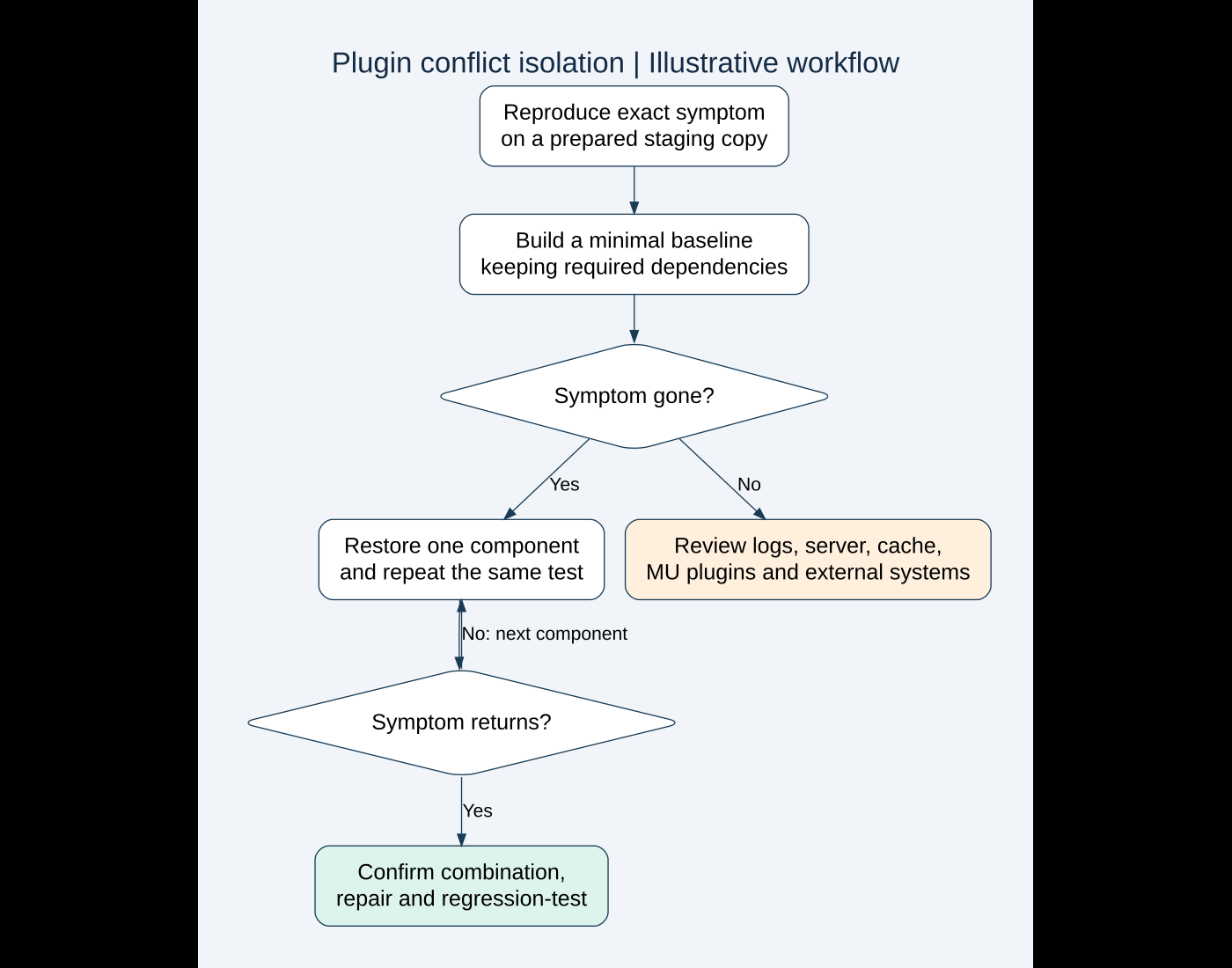
First reproduce the original symptom on the copy. If it does not happen there, write down the differences before changing plugins. A test environment with another PHP version, missing custom code or different caching is not yet an equivalent comparison.
Collect evidence from the layer that failed
| Symptom | Evidence I would inspect | What it does not prove alone |
|---|---|---|
| Button or form stops responding | Browser console, failed scripts and submission request | That every referenced plugin is responsible |
| Critical error or blank response | PHP error log and timestamp-matched request | That the last plugin named caused the whole problem |
| Order or email workflow fails later | Relevant scheduled actions, integration events and notification logs | That a successful page load proves the workflow works |
| Only some visitors see old behavior | Browser, page cache and delivery-layer differences | That a fresh administrator session matches a shopper session |
For PHP diagnosis, WordPress documents WP_DEBUG, WP_DEBUG_LOG and WP_DEBUG_DISPLAY in its debugging handbook. I would use logging deliberately on staging and keep errors out of the public page. Inspect existing configuration before adding duplicate constants.
Logs can contain file paths, personal data and other sensitive details. Protect access, collect only the relevant time window, redact shared excerpts and return temporary debugging settings to their intended state. A warning near the incident is a clue; it may be unrelated to the failing request.
Build a minimal working baseline
On staging, I would reduce the setup to the components needed to reproduce the feature. For a WooCommerce-specific issue, that usually means keeping WooCommerce and the extension under investigation, along with any essential dependency. Test with a suitable default theme when theme involvement needs to be isolated.
This follows WooCommerce’s recommended isolation approach: remove unrelated components, repeat the same steps, then restore components one at a time. I would document the actual baseline so a missing dependency is not mistaken for a newly discovered conflict.
If an extension requires its parent plugin, test them as a dependent group. Disabling the parent and observing a fatal error tells me little about their normal interaction.
Record the original state before updating versions. If a supported update may resolve the issue, test it on staging and repeat the reproduction. Mixing updates, theme changes and cache changes in one test makes the result difficult to interpret.
Restore one component and repeat the same test
Once the minimal baseline works, I would re-enable one component, reproduce the original action and record the result. Continue until the symptom returns. Keep the same product, user state and steps where they matter.
A simple log is enough:
| Illustrative state | Observation | Interpretation |
|---|---|---|
| Baseline dependencies only | The test button responds | Useful working comparison |
| Baseline plus optimization plugin | The button no longer responds | That combination needs investigation |
| Same combination with one optimization rule disabled | The button responds again | The rule is a candidate cause to confirm |
These are fictional observations, not measured results. The point is the sequence. I would confirm the candidate by repeating both the failing and working states, then examine the mechanism rather than immediately removing a whole plugin.
For instance, a script optimization rule may need a targeted exclusion. That is different from concluding the plugin is universally incompatible. A correct repair should explain which dependency or behavior the rule affected.
When the minimal baseline still fails
A failed isolation test is valuable evidence. It can mean the cause is outside the ordinary plugin list, or that the baseline still contains the failing dependency.
WooCommerce’s guide specifically calls out must-use plugins and drop-ins. These can remain involved after ordinary plugins are deactivated. I would inventory them and ask the host or responsible maintainer about anything tied to server operation rather than remove it blindly.
I would also review custom theme code, snippets, external services, server configuration and stale assets. Browser-cache bypass does not clear a host cache or CDN. Use a controlled cache procedure and note what was bypassed so the next person can repeat the test.
If the error points to a resource limit or an external service outage, pursue that evidence. Keep “plugin conflict” as a hypothesis until the combination is established.
Use session-based troubleshooting with clear limits
The official Troubleshooting plugin provides a session-based alternative and was separated from the earlier Health Check feature. Its documentation says it attempts to disable plugins and switch themes for the maintainer without affecting normal visitors. It also warns that aggressive caching can interfere.
I would prefer staging for revenue-critical or destructive tests. A maintainer’s session does not necessarily reproduce a guest checkout, asynchronous callback or scheduled background job. Confirm what the tool isolates and verify ordinary visitor behavior separately when using it.
Session isolation is also not a separate database. A test submission can still create an entry or trigger an integration. Treat the test action according to its real effect, not just the mode’s name.
Choose a repair you can maintain
Once the mechanism is clear, I would compare a supported update, configuration adjustment, targeted compatibility fix or replacement. Choose based on the business dependency, not the first workaround that hides the symptom.
Do not edit vendor plugin files as an undocumented permanent fix. An update can overwrite the change. If a custom patch is necessary, isolate it, record its purpose and version assumptions, and define when it can be removed.
A rollback may restore service temporarily, but it needs a supported recovery path and a follow-up plan. An old database restore can discard newer orders and inquiries. Restoring application code and restoring data are separate decisions.
Verify the original flow and its neighbors
I would retest the exact reported problem, then the nearby operations the repair could affect. For checkout, that may include cart updates, each enabled payment path, validation and order creation. For a form, confirm actual delivery using the contact-form email diagnosis guide.
- The original reproduction passes repeatedly under the intended configuration.
- Relevant desktop, mobile and signed-out cases are covered.
- The final configuration retains the site’s required protection and functionality.
- No unexplained related error remains in the checked test window.
- Cache and temporary debugging states are restored intentionally.
- The team has the failing combination, repair, validation evidence and recovery notes.
If I use AI, I would ask it to organize a redacted error excerpt or suggest missing test cases. I would verify its explanations against the actual code and reproduction. A plausible explanation is not evidence that a conflict was fixed.
If your site breaks after updates or two features stop working together, send me the affected URL, exact steps and recent changes. I can help define a focused diagnostic review and a repair that remains understandable after the next update.
Official references reviewed on October 13, 2026. Featured stock photograph: Juanjo Jaramillo on Unsplash. The workflow and observations above are illustrative, not client screenshots or test results.
Need implementation help?
Turn the technical fix into a reliable production solution.
If this article describes a problem you are dealing with, I can review the current setup, identify the right implementation path, and build or fix it without adding unnecessary complexity.