
A “backup completed” message is reassuring, but it does not answer the question I care about most: can the business recover the right website and data when something goes wrong?
I would build a WordPress backup plan around recovery, not the name of a plugin. That means deciding what must be saved, how much recent activity the business can afford to lose, who can access the copies and how a restore will be verified.
The examples here are illustrative. They are not client recovery stories or claims that a particular backup service has been tested on your website.
Start with two business decisions
I would first ask how much recent data could be lost without creating an unacceptable problem. Then I would ask how long the website could remain unavailable while recovery takes place.
These are often called the recovery point objective and recovery time objective. In plain language: how far back can we go, and how quickly must we be working again? They are planning targets, not promises made by installing a backup plugin.
A brochure site updated occasionally and a store taking orders throughout the day need different plans. Even a small site may collect important inquiries between backups. List the actual activity instead of choosing a schedule solely from page count or traffic.
| Illustrative website activity | Question before choosing a backup schedule |
|---|---|
| Occasional service-page edits | Could the team recreate changes since the last copy? |
| Daily inquiries or registrations | Where else are submissions retained, and how would missing ones be found? |
| Frequent WooCommerce orders | How will orders and stock changes after the backup be preserved? |
| Large media or document uploads | Does the backup include newly uploaded files as well as database references? |
1. Confirm the backup covers database and files
The WordPress backup handbook distinguishes database and files. A complete recovery needs the appropriate coverage of both, not just a content export.
The database holds much of WordPress’s content and configuration. Files include uploaded media, themes, plugins and other required application files. The exact set depends on the site, including custom paths, multisite arrangements or externally stored assets.
I would inspect the backup’s documented inclusions and exclusions. A large uploads directory may be excluded to save space; that decision should be visible rather than discovered during an emergency.
WordPress’s file backup guide and database backup guide explain the separate components. Keep matching capture times and a clear backup-set identifier. A database export stored inside an archive still needs the correct database restoration process.
A WordPress content export is useful for moving selected content, but I would not label it a complete recovery copy. Also inventory services outside WordPress: DNS, mail, external storage and payment-provider settings may require their own recovery documentation.
2. Choose storage that survives the failure you are planning for
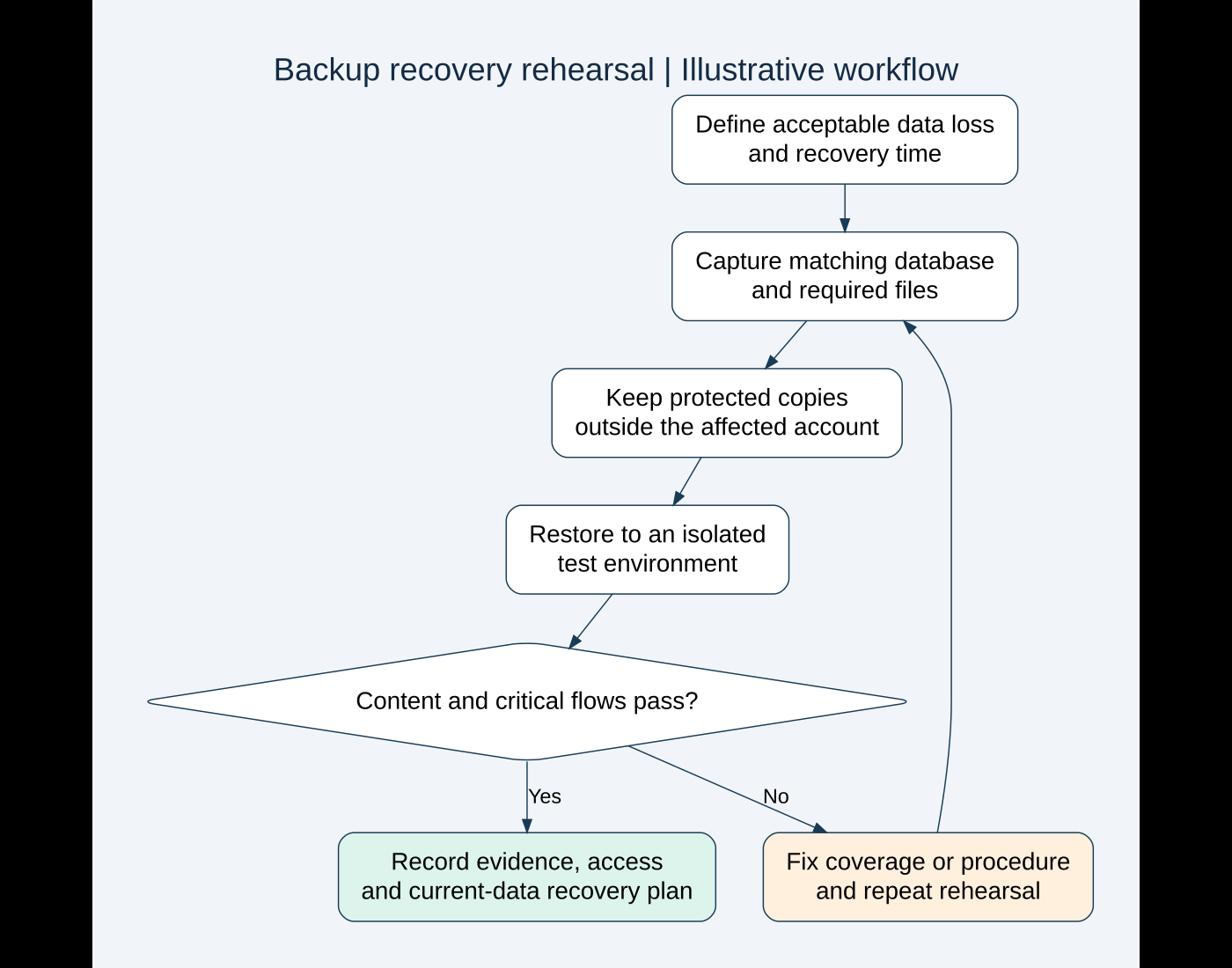
A copy stored only inside the same hosting account is vulnerable to some of the same incidents as the live site. I would keep a protected copy outside that account and verify that the authorized recovery person can reach it independently.
Think through account compromise, accidental deletion, a hosting outage and unavailable staff. A plan that requires the broken WordPress admin to download the only backup has an obvious access problem.
Backup archives can contain personal data and credentials. Restrict access, use the storage service’s appropriate security controls and keep copies away from public web directories. Document encryption and key access so protection does not become a recovery blocker.
I would also review retention. One recent copy may already contain the mistake or compromise being investigated. Keep enough history for the business’s needs, with a deliberate deletion policy and knowledge of any storage limits.
3. Monitor capture failures before an emergency
I would check the most recent successful capture, its scope and whether the off-site transfer finished. Starting a backup and completing the upload are different stages.
Look for unexpected changes in archive size, missing components, storage quotas and failed schedules. File size alone cannot prove correctness, but a large unexplained change deserves investigation.
Assign someone to receive and act on failure notifications. A warning sent to an unmonitored mailbox is not an operating process. Include the backup schedule, storage location and escalation contact in the maintenance handover.
For WordPress-based background failures, inspect the relevant scheduler and owning backup tool rather than assume the host’s backup failed too. Hosting snapshots and plugin-managed backups can use different systems.
4. Rehearse a restore in an isolated environment
I would restore a selected backup to a separate test environment before depending on it. That checks access, archive completeness, restore tooling and the instructions the team will actually follow.
Prepare the environment before importing data. A restored store may contain live integration settings or due background work. Isolate payment, email, webhook and scheduled-job effects so a rehearsal does not contact customers or create real transactions.
The staging guide covers wider preparation. For a rehearsal, record the backup timestamp, restore start and finish, environment differences and any manual steps. Do not describe an unperformed restore as a successful test.
Then verify more than the homepage:
- Administrator access works with the intended permissions.
- Representative pages, media and custom content are present.
- Important settings and custom functionality match the selected backup point.
- Forms and checkout can be checked safely under the test boundaries.
- Relevant order or inquiry records match the expected capture time.
- No live notifications or external actions were unintentionally triggered.
If the restored copy is missing something, repair the coverage or instructions and repeat. A documented failed rehearsal is useful evidence; ignoring it is not.
5. Protect newer orders and inquiries before a live restore
Illustrative scenario: a store has a backup from midnight, and a plugin problem appears at noon. Orders arrived during the morning. Restoring the entire midnight database can remove those newer order records from the website.
I would first preserve the current state and identify which data changed after the backup. Then compare recovery options: repairing the defect, restoring application files, restoring selected data with specialist care, or a full restore with reconciliation.
These options are not interchangeable. Rolling back a plugin’s files does not necessarily reverse a database migration. Restoring old database tables can affect linked records and newer activity. The chosen method needs the affected software’s supported procedure and a clear data plan.
Also reconcile external systems. A website restore does not reverse a payment already captured or a shipment already requested. The order-handoff guide explains why duplicate prevention and receiver records matter.
6. Match recovery to the incident
For an accidental content deletion, a full-site restore may be excessive. For a failed update, a targeted supported repair may preserve more current activity. For suspected compromise, simply restoring an old copy without investigating the entry point can leave the underlying risk unresolved.
I would define the recovery decision with the business owner and responsible technical team. Record what will be replaced, what may be lost, how new activity will be protected and how the result will be accepted.
Before a migration or major change, confirm a current recovery copy and its restore path. The migration checklist discusses cutover data and launch safeguards.
The handover I would want available
Keep a short recovery runbook that an authorized colleague can use when the usual developer is unavailable. Include the backup source, scope, schedule, retention, access procedure, restore prerequisites, isolation safeguards and validation checklist. Store secrets through the appropriate secure access system, not pasted into the runbook.
Record the date and outcome of the last restore rehearsal. Review the plan after major changes to hosting, order volume, custom storage or integrations. The plan should reflect the site that exists now, not the simpler site it was a year ago.
AI can help organize a fictional runbook or flag missing questions in a redacted checklist. I would not upload backup archives, credentials or customer exports to obtain that help. It cannot prove that an unread archive will restore correctly.
If you want to know whether your WordPress backups are genuinely usable, send me a brief outline of your hosting and current backup setup. I can help scope a recovery review and an isolated restore rehearsal with clear acceptance checks.
Official references reviewed on October 19, 2026. Featured stock photograph: Nick on Unsplash. The recovery scenario and workflow are illustrative, not a client incident or completed restore test.
Need implementation help?
Turn the technical fix into a reliable production solution.
If this article describes a problem you are dealing with, I can review the current setup, identify the right implementation path, and build or fix it without adding unnecessary complexity.