
The storefront loads and customers can place orders, yet a background task is late. Perhaps an export has not appeared, an integration has stopped updating, or an administrator sees a growing list of failed scheduled actions.
I would not start by deleting the list or running everything manually. First, I want to know what the affected action is supposed to do, whether it is actually overdue, and whether its business effect has already happened.
This guide explains how I would investigate WooCommerce scheduled actions and plan a controlled recovery. The examples are illustrative. They are not client incidents or claims that I have tested a fix on your store. For payment-specific renewal diagnosis, see my separate subscription renewal guide.
What a scheduled action represents
Action Scheduler is a background job library used by WooCommerce and other extensions. It records an action’s hook, arguments and scheduled time, with logs to help trace execution. Its official overview describes the queue and its background processing.
Think of an action as a request to do work, not a guarantee that the intended business outcome has finished. An extension supplies the actual task logic. A queue runner can start that logic, but the logic may depend on credentials, order data or another service.
I would therefore investigate both the scheduler and the extension that owns the task. Replacing the scheduler will not repair an expired API credential, and repairing an API credential will not help if due work is never being started.
1. Distinguish future work from delayed work
Open WooCommerce → Status → Scheduled Actions, or Tools → Scheduled Actions where available. The Action Scheduler administration reference documents filtering, searching and viewing each action’s log.
A pending action scheduled for tomorrow is not stuck merely because it has not run today. Compare its scheduled date with the current time and confirm the timezone used in your evidence. Also distinguish a recent failure from an old record retained for diagnosis.
| Observation | Question I would ask |
|---|---|
| Pending, scheduled in the future | Is that time correct for the task’s purpose? |
| Pending, past its scheduled time | Is the delay growing, and are other due tasks progressing? |
| Failed | What does this action’s log say, and did any side effect occur? |
| In progress longer than expected | Is work still executing, blocked or already timed out? |
| Complete, but output is missing | What did the callback actually complete, and what happened downstream? |
A single count is a weak diagnostic. I would compare observations over a short, recorded interval: oldest overdue time, affected hooks, new arrivals and completion progress. The important question is whether the queue is keeping up with the work that matters.
2. Capture one action’s evidence before changing anything
Record the action ID, hook, group, scheduled time, status and relevant log entries. Identify the extension and installed version responsible for it. Use a redacted order or record identifier when that helps connect the job to the business process.
I would ask what changed around the first failure: an extension update, migration, PHP change, credential rotation or external deployment. A nearby change is a lead, not proof of causation.
A practical incident note might read: “The inventory export action is overdue; three comparable actions have not progressed since the recorded time; the receiving service has no matching file.” That is more useful than “cron is broken.” It also leaves room for the investigation to find a different cause.
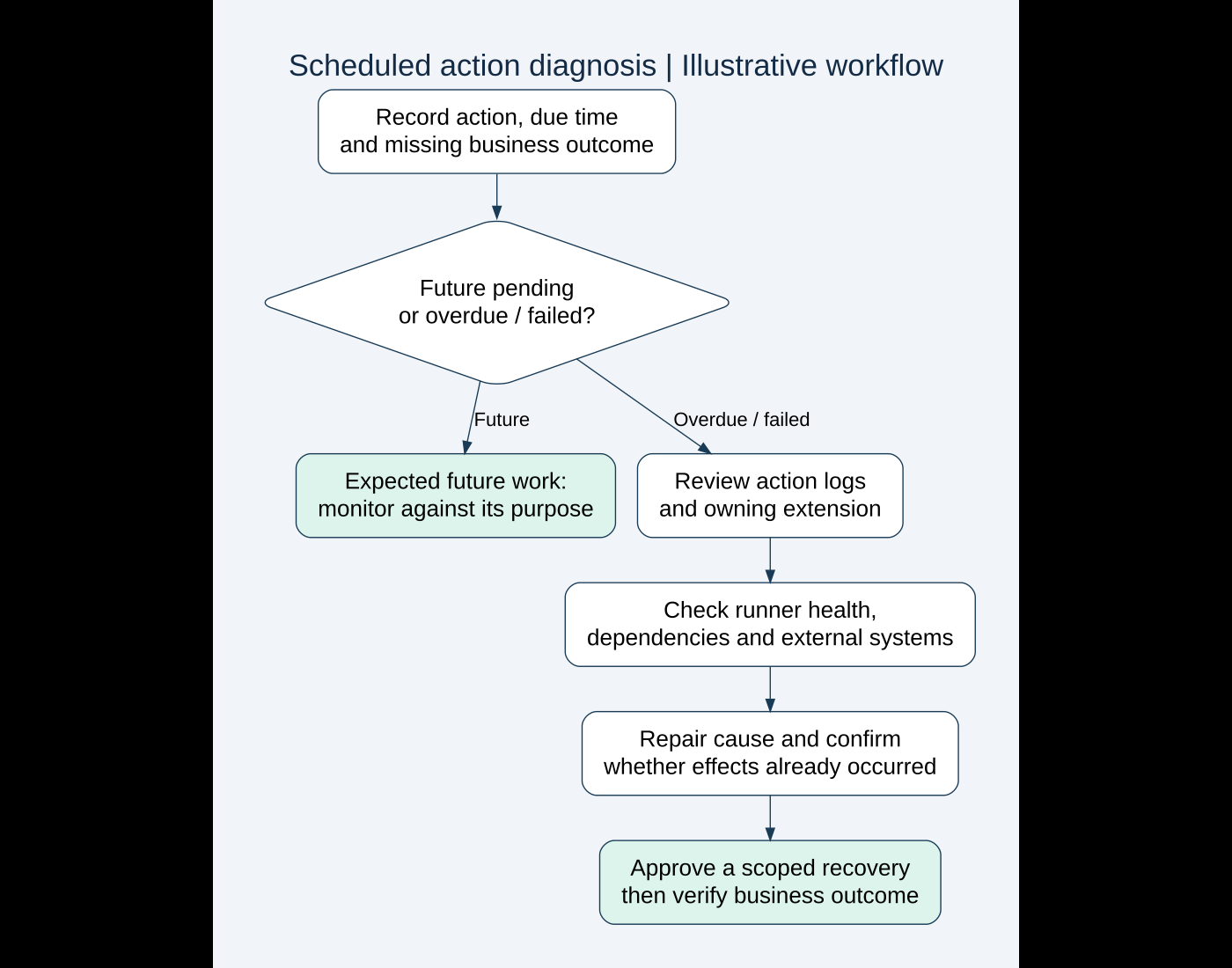
3. Separate runner problems from task problems
If many unrelated hooks are overdue, I would investigate how the site’s queue is triggered. If one hook fails while other due tasks complete, I would first inspect that task’s implementation and dependencies. Neither pattern is conclusive, but it gives the next check a purpose.
WordPress explains that WP-Cron normally checks scheduled tasks during page loads rather than running as a continuously active system scheduler. A site using a server scheduler needs its own configuration checked; do not assume ordinary traffic is its intended trigger.
I would confirm whether a server cron is configured, whether WordPress’s normal trigger has been intentionally disabled, and whether the configured command or request succeeds. Coordinate with the host before changing this arrangement. Disabling WP-Cron without a working replacement can make the problem worse.
Action Scheduler also documents asynchronous loopback processing. Check relevant loopback failures, access challenges, server errors and resource constraints. A staging password or firewall rule may affect requests differently from an administrator’s browser. Inspect the specific failed request rather than broadly removing protection.
4. Read the callback failure in context
A PHP error, missing dependency, timeout and external rejection call for different repairs. I would correlate the action’s log with the relevant PHP or integration log using the timestamp and a safe identifier.
If a task calls an external service, check its response and the destination’s record. Was the payload rejected? Did the destination accept it but fail later? Was the local process interrupted after the remote operation succeeded?
That last possibility is why I would not infer “nothing happened” from a failed status. For an outgoing order handoff, my webhook diagnosis guide explains how to separate delivery from completed processing.
For a repeatable extension conflict, use a controlled staging comparison rather than deactivate unrelated live features. The plugin conflict guide covers that isolation process. Preserve the evidence before updating software so the original failure remains explainable.
5. Decide whether replay is safe
Illustrative scenario: a custom task sends an order to a fulfillment service. The service creates its record, but the local task fails before saving the external record ID. Running it again could create a second fulfillment request unless the integration prevents duplicates.
I would check the receiving system before approving replay. Establish whether the business operation already completed, whether there is a stable cross-system reference and how repeated requests are handled.
For an update task, “ignore every later action for this order” is not necessarily safe either. A genuine later change may still need processing. Recovery must respect the operation’s semantics, not just the presence of an order ID.
Do not bulk-run payment, email or fulfillment actions simply to clear a warning. Confirm the owning extension’s recovery procedure and use a small, approved scope. A manual run is a real action with possible customer-facing effects.
6. Restore progress without overloading the store
I would repair the identified cause before processing a backlog. That might mean correcting a supported configuration, updating a faulty callback or restoring access to a dependency. The repair should explain why the next attempt is expected to behave differently.
Action Scheduler’s background processing guidance warns that increasing concurrent batches can substantially increase load. I would not copy a concurrency or time-limit snippet into an unknown hosting environment as a universal speed fix.
For a large queue, an experienced maintainer can consider the supported Action Scheduler WP-CLI workflow. Review the installed command help, filters and dependencies before execution. Command-line processing does not make an unsafe callback safe, and a faster producer of failures is not recovery.
Agree an observation window and stop conditions: rising errors, saturation, duplicate business records or unexpected customer notifications. Monitor storefront responsiveness as well as queue progress.
7. Verify outcome, not just a lower count
I would define acceptance before recovery begins. For a synthetic inventory-export example, that could mean the intended file is present, contains the correct records and is accepted by the destination.
- The identified cause is repaired and documented.
- A small controlled task completes with the expected output.
- Duplicate and partial-completion cases are handled as agreed.
- Old overdue work progresses without unexplained new failures.
- Newly due tasks continue to progress after the initial recovery.
- Customer-facing flows remain responsive and correct.
- Sender and destination records are reconciled for the affected interval.
Keep future scheduled work intact. Deleting pending actions to make the number smaller can remove work the store still needs. Historical logs and task cleanup should follow the owning software’s supported retention behavior, not an improvised database purge.
A useful handover for ongoing maintenance
I would leave a short record of the affected hooks, responsible extension, diagnosis, changed configuration, recovered records and remaining limitations. Name the person who will review the next failure and define how overdue work will be noticed.
Monitoring should distinguish a temporary delay from a persistent failure. Choose alert criteria around the business process and normal workload rather than treating every pending action as an emergency.
AI can help organize a redacted timeline or suggest questions about a fictional task. I would verify its explanation against logs, official documentation and the installed implementation. Do not upload customer payloads, secrets or private logs just to obtain a plausible-sounding diagnosis.
See my WooCommerce subscription renewal troubleshooting guide for payment-specific recovery checks. I also provide custom WooCommerce development and technical troubleshooting when scheduled processes require a code-level fix.
If your WooCommerce store has overdue background work or repeated scheduled-action failures, send me the affected hook, symptom and a brief description of the missing outcome. I can help scope a careful investigation and a recovery plan that protects the business operation behind the queue.
Official references reviewed on October 19, 2026. Featured stock photograph: Kevin Ache on Unsplash. The workflow and fulfillment example are illustrative, not client evidence or live tests.
Need implementation help?
Turn the technical fix into a reliable production solution.
If this article describes a problem you are dealing with, I can review the current setup, identify the right implementation path, and build or fix it without adding unnecessary complexity.