
A checkout field is useful only when the right person can use its value after the order is placed. A purchase-order reference that looks good on the page but disappears from an invoice export has not finished its job.
When I plan a custom WooCommerce checkout field, I start with that handoff: what should the shopper enter, where should it be saved, and who needs it next? Then I check the checkout architecture before choosing an implementation.
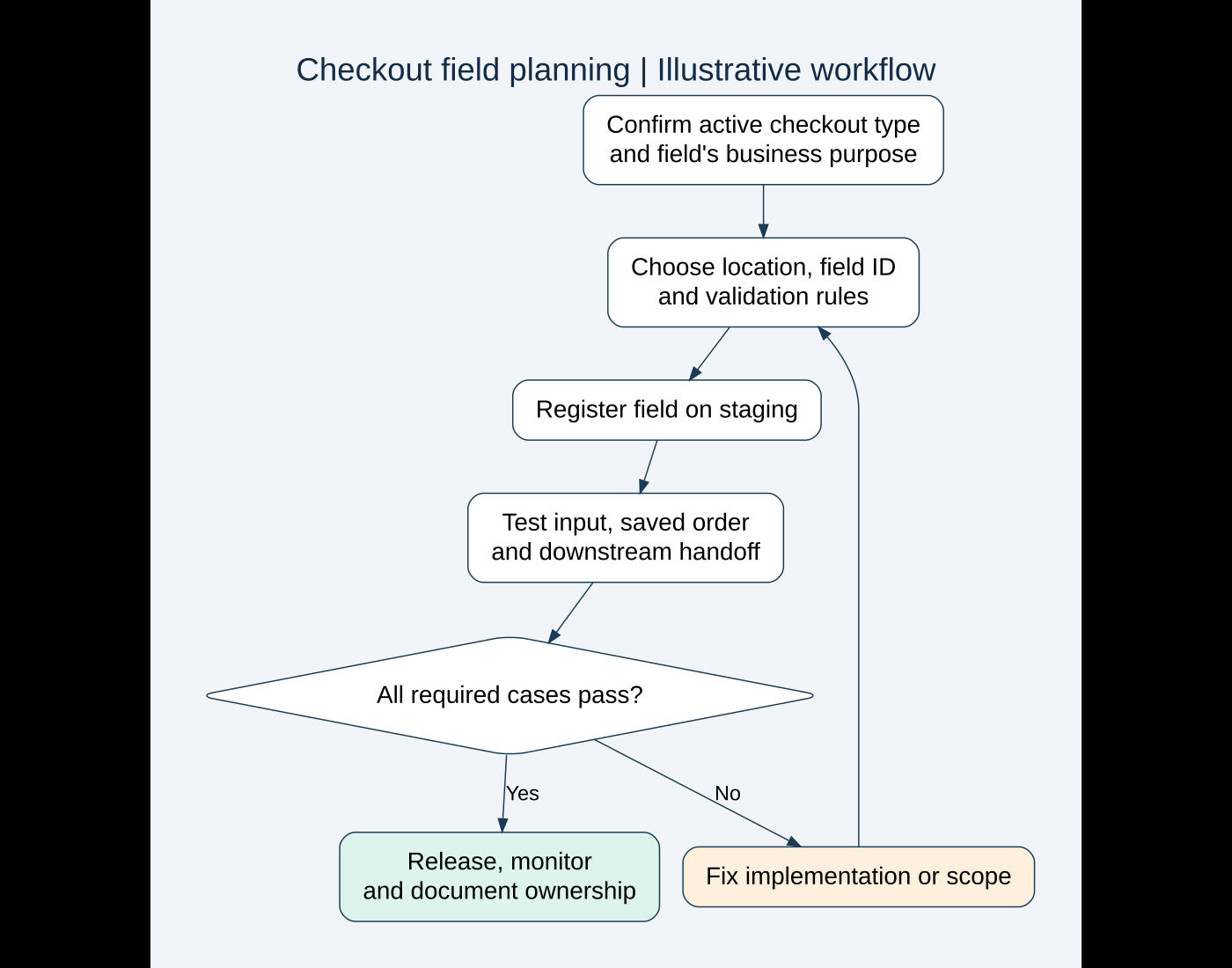
This guide focuses on the Checkout Block and a small, maintainable field implementation. The example is an illustrative demonstration, not a client case study or a claim that I have tested this code in your store. I would adapt and verify it on staging before a production release.
First, confirm which checkout your store actually uses
Open the page assigned as checkout and inspect its editor content. A WooCommerce Checkout Block and the classic [woocommerce_checkout] shortcode are different implementation paths. A custom theme or builder may introduce further changes, so I would also inspect the public checkout and the extensions controlling it.
I would not choose a field snippet because its title says “WooCommerce checkout.” WooCommerce’s hook alternatives reference shows that support for classic hooks varies in the blocks. A hook that changes the classic form is not evidence that a field will render or behave correctly in the Checkout Block.
Record the installed WooCommerce version, checkout type, payment methods, field-related plugins and any existing snippets. This small inventory prevents adding a second implementation for a field that another extension already owns.
If the store is moving from classic checkout, I would make a field map before the change. List every existing label, saved key, validation rule and downstream dependency. A migration should explain what happens to historical values as well as new orders.
Define the smallest field that solves the problem
Illustrative scenario: imagine a business that accepts an optional purchase-order reference from buyers. Its office team needs that reference while processing the current order. It is not a permanent customer preference, and shoppers without a reference should be able to complete checkout.
I would write a short acceptance statement: “A buyer can enter a purchase-order reference, place an order without it, and the office team can retrieve the saved value for that order.” This is clearer than “add a text box.”
| Decision | Example requirement | Reason |
|---|---|---|
| Purpose | Help staff match the order to the buyer’s purchase order | Gives the field an operational owner |
| Scope | Current order only | Avoids reusing an old reference on a later purchase |
| Required? | No | Buyers without a reference can still purchase |
| Content rules | Plain text; agree a sensible length with staff | Prevents treating arbitrary input as an instruction or executable content |
| Downstream use | Order review and the agreed invoice/export workflow | Makes end-to-end verification possible |
Before development, I would ask whether the existing order notes already meet the need. A dedicated field may improve structured processing, but another input adds work for the buyer and another dependency for the maintainer. There is no benefit in collecting information nobody uses.
Choose the correct field location
WooCommerce’s additional checkout fields reference defines three locations: contact, address and order. Contact fields become account information; address fields appear in both billing and shipping and are saved with customer and order data; order fields belong to the order and are not prefilled from a previous purchase.
For the fictional purchase-order reference, I would choose order. If a buyer places two separate purchases, each should have its own reference. An address-level value is a poor fit for that requirement.
Placement is also a usability decision. I would use a clear label, explain optional input when necessary and keep the question near the relevant decision. Ask a colleague to read it without project context. If they cannot tell what to enter, improving the label is more useful than adding elaborate styling.
Register a simple field through the supported API
The official Checkout Block field tutorial documents woocommerce_register_additional_checkout_field() and the base feature’s minimum WooCommerce version of 8.9. Register on woocommerce_init or later. Newer field types or options can have further version requirements, so check them against the installed version.
The following demonstration registers an optional text field. It belongs in a small custom plugin, after its plugin header, rather than in the parent theme or pasted into the checkout editor. It does not include the later invoice/export integration.
add_action( 'woocommerce_init', function () {
    if ( ! function_exists(
        'woocommerce_register_additional_checkout_field'
    ) ) {
        return;
    }

    woocommerce_register_additional_checkout_field( array(
        'id'       => 'jh-order-tools/purchase-order-reference',
        'label'    => __(
            'Purchase order reference',
            'jh-order-tools'
        ),
        'location' => 'order',
        'type'     => 'text',
        'required' => false,
        'sanitize_callback' => function ( $value ) {
            return sanitize_text_field( $value );
        },
    ) );
} );
The namespace helps distinguish this field from other extensions. I would keep that identifier stable after launch and document it. Renaming a field later is a data decision, not merely a label change.
The function guard prevents a call to an unavailable API. It is not a substitute for a compatibility check: if the API is unavailable, the field is absent. A production implementation should make unsupported requirements clear to the administrator rather than quietly rely on the guard.
Separate sanitization, validation and business approval
Sanitization normalizes input; validation decides whether it satisfies the agreed rule. Neither proves that a purchase-order number exists in the buyer’s procurement system. I would define those as separate requirements.
The API reference documents field sanitization and validation callbacks. In a real implementation, I would add any agreed length or format check and return a helpful error for invalid input. I would test blank optional input, ordinary values, spaces, punctuation, long strings and non-English characters against the actual specification.
I would avoid an unnecessarily restrictive rule that rejects legitimate references containing a slash or dash. If the office team only needs a readable identifier, a strict invented format can block purchases without improving processing.
For conditional questions, WooCommerce now documents conditional additional fields. I would check the version requirements and supported schema for the installed release, then test both the visibility and requiredness rules. Simply hiding an input with CSS does not define what the server should accept.
For example, if a question appears only for a particular delivery choice, changing that choice should not leave an invisible required field blocking checkout. Test switching in both directions and inspect what happens to a value entered before the condition changes.
Follow the saved value into every required destination
I would place a marked test order and check the saved value before adding an export or invoice mapping. The additional-fields reference recommends helper methods for retrieving values rather than depending unnecessarily on raw storage details.
Write the downstream mapping explicitly: field identifier, expected value, destination and the extension responsible for reading it. Do not assume every invoice, fulfillment export or external integration automatically includes a new field just because WooCommerce saved it.
If the store uses custom order code, my HPOS compatibility audit explains why supported order access matters. I would include the active order-storage configuration in the test record and avoid building a new integration around direct posts-table assumptions.
The historical-order case needs a decision too. Orders placed before the field existed may have no value. Staff should see an understandable absence, and an export should handle it without inventing a reference or throwing an error.
A staging checklist that follows the shopper’s path
I would use a staging environment with intentional payment and communication boundaries. Sandbox payments and suppressed emails are helpful, but they limit what the test proves. My staging guide covers the wider deployment preparation.
| Test case | Evidence I would collect |
|---|---|
| Guest order, field left blank | Checkout completes and no fabricated value is stored |
| Guest order, ordinary reference | Exact expected sanitized value reaches the order and required output |
| Returning customer, second order | An old order-specific reference is not unexpectedly reused |
| Invalid or oversized value | Agreed validation works with a readable message |
| Mobile and keyboard navigation | Label, focus, input and errors remain usable |
| Each enabled payment path, including express flows | The field requirement is respected or an unsupported flow is documented |
| Older order and downstream retry | Missing values and repeated integration processing are handled as intended |
Express payment deserves deliberate attention. I would not claim it supports the field based on an ordinary checkout test. Use the actual enabled gateway and flow, record limitations and agree how buyers should proceed if the requirement cannot be met there.
For each test, record the checkout type, versions, order ID, expected outcome and observed outcome. Keep payment details and customer information out of shared evidence.
Use AI to review the specification, then verify the behavior yourself
I would give AI a fictional field specification and ask it to identify missing test cases, confusing labels or contradictory rules. That can help turn a vague request into a better review checklist without exposing customer orders or private project code.
I would independently check generated API suggestions against official documentation. Ask the model which checkout architecture it assumes. If it mixes classic hooks, browser-only logic and block field registration without explaining the boundary, the implementation needs another review.
AI cannot confirm that the saved reference reached an inaccessible accounting system. That needs evidence from the integration. My AI usability workflow explains how I would use generated suggestions while keeping human verification central.
What makes the feature maintainable after launch?
I would hand over the field’s purpose, stable identifier, validation rules, integration mapping and test checklist. Put the implementation in version control and identify who owns updates. Keep a rollback plan that explains what happens to already collected values if the field is disabled.
The launch check should cover both a new order and staff processing. A neat checkout screenshot is only the beginning; the useful result is an input that shoppers understand and a value the business can reliably use.
If your store or agency needs a custom checkout field, send me its purpose and where the value needs to go. I can help define the smallest suitable implementation, identify compatibility questions and prepare a practical test plan.
Official technical references reviewed on October 13, 2026. Featured stock photograph: Campaign Creators on Unsplash. The diagram and purchase-order example are illustrative; this article does not claim live client testing.
Need help fixing this on your website?
Need help fixing this on your website? Chat with me on WhatsApp.