A failed subscription renewal is not one problem with one fix. The scheduled renewal may not have run, the renewal order may have been created but declined, the saved payment token may be unusable, or a gateway callback may not have reached the store. I would identify the failed stage before changing settings or asking a customer to pay again.
This guide explains the investigation I would use for WooCommerce Subscriptions. The example is illustrative and uses synthetic order details; it is not a client incident or a claim that a snippet was tested on a live store.
Understand the records involved
A subscription describes an ongoing agreement and its payment schedule. Renewal orders record individual transactions. WooCommerce’s subscription orders documentation explains this distinction and the relationship between a subscription and its parent, renewal, switch or resubscribe orders.
I would therefore collect both IDs. Looking only at the subscription can hide the gateway response attached to the renewal order. Looking only at the order can hide the next payment date, payment method and status of the agreement.
| Evidence | What it can answer | What it cannot prove alone |
|---|---|---|
| Subscription status and dates | What should happen next | Why a gateway declined a charge |
| Renewal order notes | Sequence recorded by WooCommerce and extensions | Every event in the gateway account |
| Gateway log | Request, response or error details when logging is available | That the scheduled action ran on time |
| Scheduled Actions | Whether renewal work is pending, complete or failed | Whether the bank will approve a retry |
1. Record the failure without exposing customer data
I would note the subscription ID, renewal order ID, expected renewal time, actual statuses, payment method, relevant order notes and timestamps. Screenshots and logs should be redacted before sharing. Card details, tokens, API secrets and private customer information do not belong in a support message.
I would also record what changed recently: gateway version, WooCommerce or Subscriptions update, hosting move, webhook settings, cron configuration, currency, taxes, recurring amount or a custom renewal hook. Timing often narrows the search faster than random plugin changes.
2. Decide whether this is one customer or a store-wide pattern
One decline may be an expired card, insufficient funds, authentication requirement or issuer decision. Several failures beginning at the same time suggest a store, gateway or scheduling problem.
I would compare a small set of recent renewals using the same gateway. I would not repeatedly charge multiple customers as a diagnostic test. The questions are: were renewal orders created, did payment attempts reach the gateway, and do the failures share the same message or timestamp?
3. Check the subscription and renewal order together
I would open the subscription, confirm the payment method and next payment information, then follow its related orders to the failed renewal. Order notes may show whether an automatic charge was attempted, whether the order moved between pending and failed, or whether a retry was scheduled.
Statuses have specific meanings. The official Subscriptions status guide is a better reference than guessing from the label. I would avoid manually changing statuses until I understand the consequences for access, emails and future renewal scheduling.
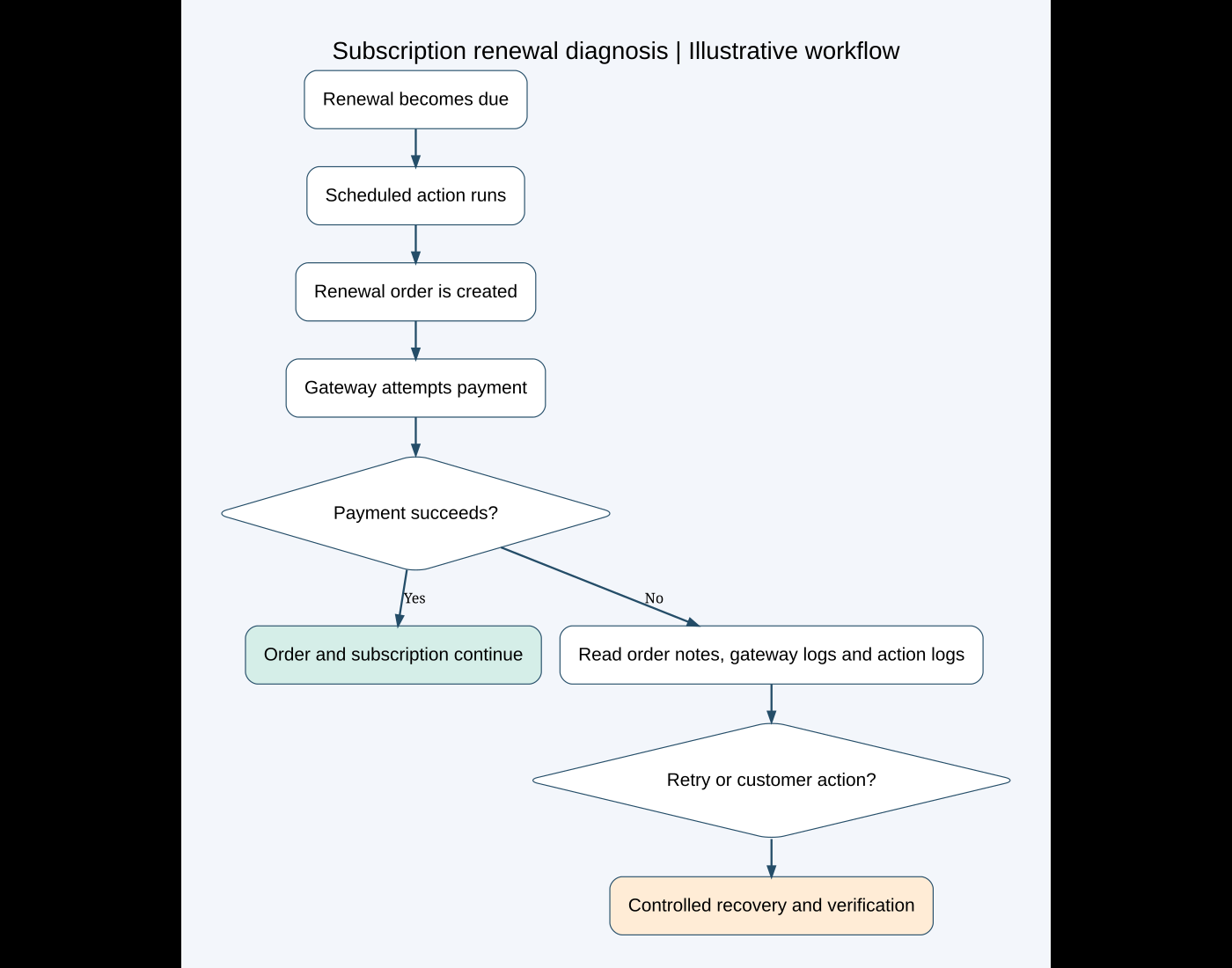
4. Inspect Scheduled Actions
WooCommerce Subscriptions relies on scheduled events. Its requirements and WP-Cron troubleshooting guide directs store owners to WooCommerce → Status → Scheduled Actions to look for pending or failed subscription actions.
I would filter around the expected renewal time and inspect the action’s hook, status, arguments and log. A large queue of overdue actions may indicate that WP-Cron is not receiving reliable traffic or that a long-running task is blocking the queue. A failed action should have an error that can guide the next check.
I would not click “Run” on a production renewal action merely to see what happens. It may attempt a real charge. A controlled renewal test belongs on staging with an approved gateway test mode and synthetic data, following the gateway and Subscriptions documentation.
5. Read the gateway response and configuration
If the order exists and payment was attempted, I would compare the order note and WooCommerce gateway log with the transaction or event in the gateway dashboard. The exact response matters more than a generic “payment failed” label.
I would check that live and test credentials are not mixed, required webhooks point to the current domain, webhook signatures match, and the gateway version supports the installed Subscriptions workflow. An ordinary WooCommerce payment gateway is not automatically capable of automatic recurring payments or saved payment method changes.
I would also confirm that the subscription carries the intended payment method. A successful initial checkout does not prove that a reusable token was stored for later off-session charges.
6. Distinguish decline, token and callback failures
- Issuer decline: the gateway received the attempt but the bank rejected it. The customer may need to update the method or contact the issuer.
- Missing or invalid token: the store cannot perform the future charge with the saved reference. The gateway’s supported change-payment workflow matters.
- Authentication required: an off-session renewal may need customer action under the gateway’s rules.
- Webhook/callback problem: the gateway processed an event but WooCommerce did not receive or accept the notification.
- Scheduling failure: no renewal attempt occurred because the action did not run correctly.
These paths should not receive the same recovery message. Asking a customer to update a card will not repair cron, and replaying a webhook will not resolve a bank decline.
7. Understand retries and customer recovery
WooCommerce Subscriptions includes a failed recurring payment retry system when enabled and applicable. I would review its retry rules and current scheduled actions rather than create duplicate manual attempts. The official Subscriptions documentation index links to the retry reference and testing guide.
For an eligible failed renewal, WooCommerce’s renewal process documentation explains that the customer may pay the failed order with a gateway that supports changing the payment method. That can update the method used for future automatic renewals. Available gateways therefore depend on capability, not merely which gateways are enabled at checkout.
Manual and offline renewals need special attention. The official FAQ notes that a short Hold Stock time can cause manual renewal orders to fail before an offline payment completes. I would confirm the store’s payment model before changing that setting.
8. Verify recovery without causing a duplicate charge
Before retrying anything, I would check the gateway dashboard for an existing successful or pending transaction. If the gateway shows success while WooCommerce shows failure, the problem is reconciliation—not permission to charge again.
After an approved recovery, I would verify the renewal order, subscription status, next payment date, gateway transaction reference, related scheduled actions and customer email. I would also confirm that access or fulfillment matches the business rules.
A practical verification checklist
- Subscription and renewal order IDs are linked and recorded.
- The failure time and recent technical changes are known.
- Scheduled Actions show whether the renewal process ran.
- Order notes and gateway events agree, or their difference is documented.
- No retry is initiated before checking for an existing charge.
- The gateway supports the required recurring and change-payment behavior.
- A staging test uses test mode and synthetic data.
- Recovery confirms the next renewal schedule, emails and customer access.
When I would involve the gateway or hosting provider
I would contact the gateway when its dashboard contains a decline or tokenization error that needs account-specific explanation. I would involve hosting when scheduled actions remain overdue, loopback requests fail or server errors coincide with renewal times. I would provide timestamps and redacted identifiers instead of a broad “subscriptions are broken” report.
For ordinary checkout failures, see my WooCommerce payment gateway checklist. For safe deployment, my staging workflow explains how I separate tests from live orders.
If your WooCommerce renewals are failing or behaving inconsistently, send me the redacted subscription/order IDs, gateway name and approximate failure time. I can help trace the process and prepare a controlled recovery plan without guessing or risking duplicate charges.
Featured photo: rupixen on Unsplash. Diagram created for this guide. Official WooCommerce documentation reviewed October 10, 2026.
Need help fixing this on your website?
Need help fixing this on your website? Chat with me on WhatsApp.