
“If I change the homepage layout, will the change appear in every language?” That is one of the first questions I would resolve before building a multilingual Elementor website. A translated page can look identical to the original while still being a separate page with its own editing history.
The answer depends on how the site stores its layouts, translations and shared components. I would not promise that every design change will synchronize automatically just because a translation plugin is installed. Here is how I would plan a setup that remains understandable when the business needs its next update.
Illustrative scenario: this guide uses a fictional service website with English, French and Arabic homepages. It demonstrates planning and verification; it is not a client case study or a report of tests performed on a live site.
Separate the three things people often call “translation”
I would begin by distinguishing translated content, shared presentation and language-specific behavior. Content includes headings, body text, button labels and form messages. Presentation includes spacing, colors, typography and section structure. Behavior includes links, menus, form destinations and which page the language switcher opens.
A system might update the wording through a translation editor while the layout follows the source page. Another setup might keep independently edited Elementor pages. A shared header could have its own translation workflow. Those differences affect both the build and the maintenance estimate.
| Change | Likely owner | Question I would verify |
|---|---|---|
| Brand color | Shared design settings | Do all relevant elements use the shared value? |
| French enquiry label | French content | Will the next source update preserve this translation? |
| New homepage section | Source layout and translation workflow | How does the section reach each language? |
| Arabic menu direction | Language-aware layout | Does the whole navigation work in right-to-left mode? |
1. Inventory the current setup before choosing a workflow
I would record the Elementor editor version, Free or Pro features in use, active theme, translation plugin and edition, and any integration add-ons. I would also list where the header, footer, forms and reusable sections are built. A page-level solution cannot automatically solve a header generated somewhere else.
Next I would choose one existing page and trace its translations. Are they separate WordPress pages linked by language? Are edits made in Elementor or a translation editor? Are some translations duplicates that still follow the source? I would write down the answer rather than infer it from the public appearance.
For an existing site, I would also identify the editorial owner. If a translator edits the French page directly while another person updates it through an automated translation workflow, they may overwrite each other’s work. Clear ownership is part of maintainability.
2. Choose between shared layout and independent designs
For the demonstration site, I would prefer a common layout where the offer and visitor tasks are the same across languages. This reduces the number of structural variations to check. It does not remove the need to review text wrapping, images and links in each language.
Independent designs make sense when markets genuinely need different content or page structure. For example, one market might require an extra service explanation. I would document that as an intentional difference so someone does not later “fix” it by copying the source page.
WPML’s Elementor documentation describes translation through its dashboard and also supports different designs per language. These are different working approaches. I would select and demonstrate the intended one on staging before committing the whole website to it.
With Polylang, I would inspect the actual integration rather than assume a feature list applies to every edition. Its Elementor guide uses Polylang Connect for Elementor for the integration and identifies additional requirements for Theme Builder and WooCommerce use. That is a reason to check the complete stack, not only the main plugin name.
3. Do not confuse duplication with ongoing synchronization
Copying a layout is a useful starting point. It is not evidence that future edits to the original will update every translated copy. I would treat duplication as a build action and synchronization as a separate behavior that must be confirmed.
Polylang’s content duplication guide explicitly describes a Polylang Pro feature. It copies content to create a translation and notes that media text may still need translating. I would not advertise that feature as a free, automatic translation solution.
Similarly, Elementor documents saving a page as a template and inserting it elsewhere. I would verify whether a particular use is an inserted copy or a live shared component. The word “template” alone is too vague for a maintenance promise.
My acceptance question would be concrete: “When I add this section to the source page, what exact steps are required before it appears correctly in French and Arabic?” The answer should be a short procedure the owner can repeat.
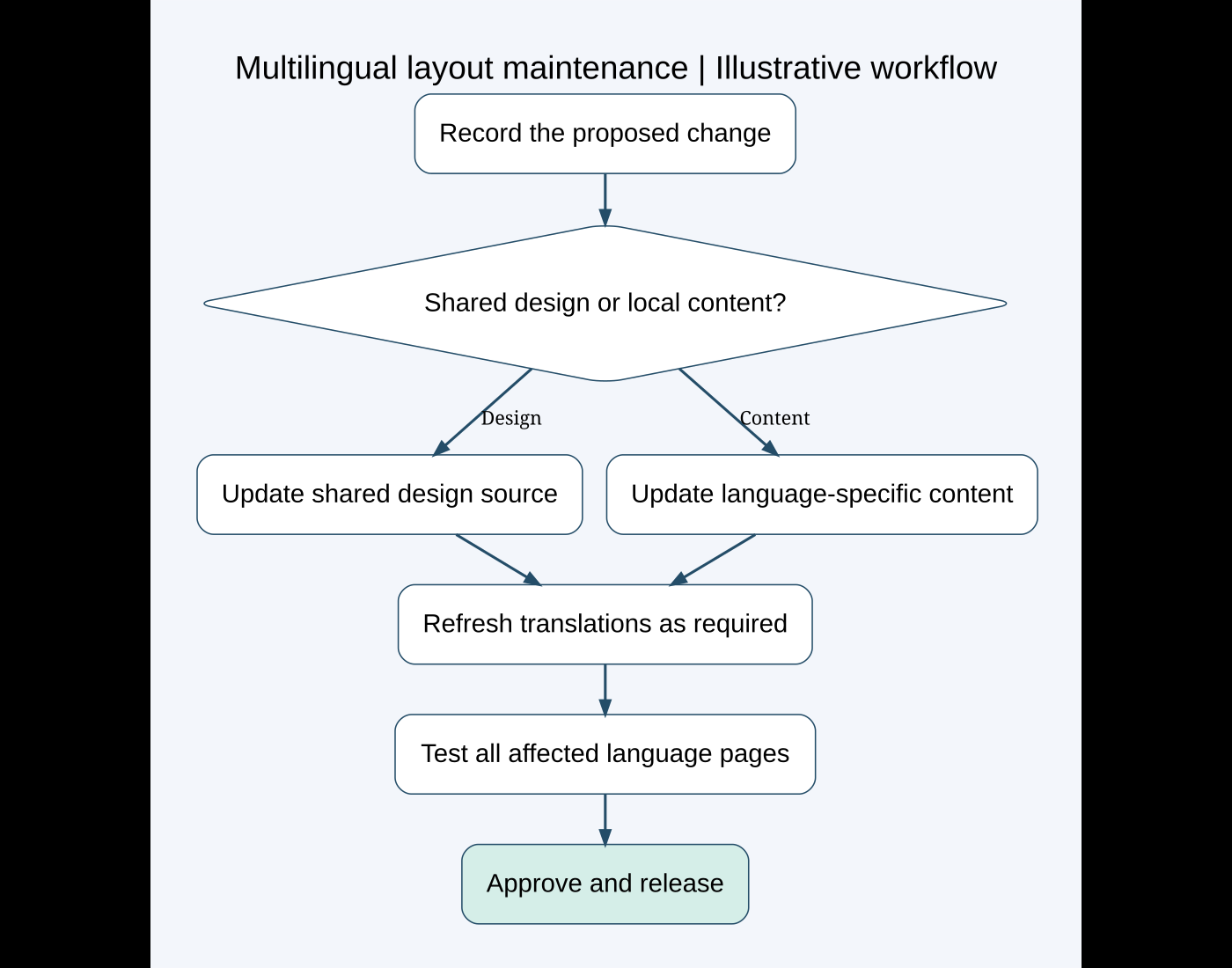
4. Build a shared design system without hiding exceptions
I would define a small set of typography, color and spacing rules, then apply them consistently. A shared value helps only where the relevant elements actually reference it. One-off overrides deserve a note because they can explain why a global change misses a button or heading.
I would avoid giving every language a different collection of arbitrary margins. Instead, I would first check whether the common layout can accommodate longer headings and paragraphs. Fixed-height text boxes are a warning sign when content length varies.
For intentional exceptions, I would use a named rule or component rather than scattered fixes. A language-specific adjustment should be easy to find and explain. If a future developer needs to open every widget to discover how the page works, the handover is incomplete.
For project planning, my Elementor versus custom theme guide provides context. A custom component with translated fields may suit repeated structured content; an independently edited page may suit a small site with infrequent changes.
5. Prove the update path with a small staging experiment
I would use a staging copy and one representative page before translating the full site. My staging guide explains the wider deployment precautions.
- Record the source page and linked language pages, with screenshots and content notes.
- Make one harmless structural change, such as adding a labeled demonstration section.
- Complete the chosen translation-update procedure.
- Confirm whether the section, translated text, links and responsive settings reach every language as intended.
- Edit one translated sentence and repeat the source update to check whether local work is preserved.
- Document the result and remove the demonstration section before release.
This experiment should be performed on the actual installed combination. I have not performed it on a client environment for this article. Its purpose is to expose the update behavior before the business depends on it.
6. Review Arabic and longer translations as real layouts
For the Arabic demonstration page, I would review text direction, icon placement, menu alignment and mixed-direction content such as email addresses. I would not mirror every image automatically: a logo or photograph may not need flipping, while a directional control may need different treatment.
I would ask a fluent reviewer to check the wording and the visual reading order. If Arabic letters appear separated, I would investigate the font, text content and styling rather than insert manual spaces or convert important text into an image.
For French, I would check long button labels, headings and menu items on small screens. I would also examine text zoom and line wrapping. The goal is a layout that accepts realistic translations, not a translation shortened solely to fit a fragile box.
7. Treat forms, links and SEO as separate checks
A translated heading does not guarantee a translated form error. I would inventory placeholders, required-field messages, success text, email subjects and recipient settings. For each language, I would submit synthetic data and verify both the visitor feedback and the actual delivery.
I would check the language switcher from an inner page, not just the homepage. It should follow the agreed behavior when a translation exists and when it does not. Buttons should point to the intended language destination rather than accidentally returning the visitor to the source language.
I would also inspect page titles, descriptions, canonical links and language annotations in the public HTML. I would use the translation plugin’s supported SEO workflow and check the result; manually adding another set of language tags can create conflicts. A multilingual setup does not guarantee rankings.
8. Hand over a maintenance procedure the owner can use
I would provide a short guide stating where source layout edits happen, where translations are edited, what must be refreshed after a change and who approves each language. A video showing one real update path is more useful than a general tour of every admin menu.
The handover should also identify licences, custom integrations and intentionally different sections. These affect future costs. A free plugin can be appropriate, but a workflow requiring hours of repeated layout work is not automatically the least expensive option.
- One source page and all linked translations are recorded.
- The shared-versus-independent design decision is documented.
- A source layout change and a local content change have defined procedures.
- Forms, menus and language switches have language-specific acceptance checks.
- Long translations, right-to-left content and mobile layouts receive review.
- The owner knows how to recover or request help if an update overwrites content.
If you are planning a multilingual Elementor site or struggling to keep translated pages consistent, share the current stack, language list and a typical update you need to make. I can help choose a maintainable workflow and define what should be verified before launch.
Featured photo: Domenico Loia on Unsplash. Diagram created for this guide. Official technical references reviewed October 7, 2026.
Need help fixing this on your website?
Need help fixing this on your website? Chat with me on WhatsApp.