
A store owner usually describes a custom feature in a very reasonable way: “Can we add this field?” or “Can the order email include a different message?” The visible change may be small, but the rule behind it can affect checkout, order data, customer access, and future updates.
I think the useful question is not simply whether WooCommerce can do it. It is whether the feature will remain understandable and dependable after the store grows, the theme changes, or another developer takes over. Here is how I would plan a custom WooCommerce plugin with that longer view in mind.
This guide uses an illustrative store scenario, not a report of a particular client project. It gives business owners and agency teams a practical way to discuss scope, compatibility, testing, and handover before approving development.
Start with the business rule, not the requested button
Before choosing a hook or writing a settings screen, I would ask what the business needs to happen. Who makes the decision? Which products are involved? At what point should the rule apply? What should happen when payment fails, an order is refunded, or a customer changes their selection?
For our example, imagine a training business selling both in-person and online attendance. It wants an extra joining-instructions section in the customer email for eligible online purchases. That sounds simple until you consider mixed carts, unpaid orders, resent emails, and staff editing the instructions after a sale.
A clearer brief would say: “Allow authorized staff to configure instructions for selected variations. Show the appropriate information in agreed customer emails only when the order meets the defined payment and eligibility rules.” That brief gives the developer something testable, rather than a vague request to put text somewhere.
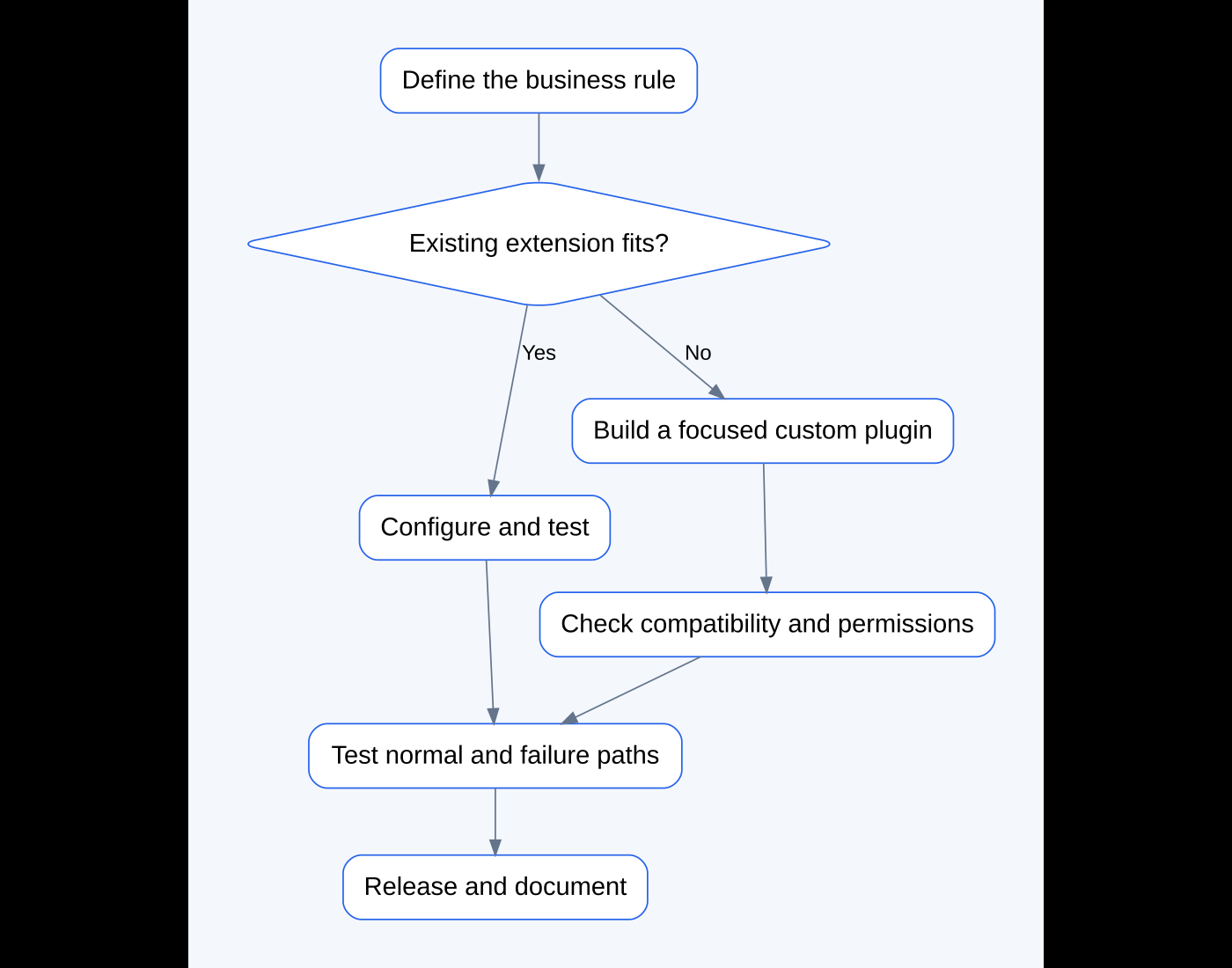
Decide whether an existing extension already fits
I would check the current WooCommerce settings and installed extensions before commissioning another feature. Sometimes the best solution is configuring what is already there. Sometimes a supported extension covers the whole requirement more reliably than a bespoke build.
| Approach | Good fit | What to consider |
|---|---|---|
| Existing store settings | The requirement matches an available option | Confirm the option handles all relevant products and customer paths |
| Established extension | A common feature with ongoing vendor support | Licensing, compatibility, support quality, and unnecessary complexity |
| Small managed snippet | A narrow change with a clear owner | Where it lives, how it is tested, and who maintains it |
| Focused custom plugin | A business rule involving settings, saved data, or several integration points | Development, documentation, testing, and future support |
I would not choose custom code just to reduce the visible plugin count. One well-maintained extension can be a better investment than a collection of undocumented snippets. The aim is a clear solution whose responsibilities are easy to understand.
Give business logic a sensible home
My preference for a feature with several moving parts would be a focused plugin rather than hiding everything inside the theme. A theme should be able to change without unexpectedly removing an important order rule. The plugin can hold the eligibility checks, settings, and integration with WooCommerce; the theme can control presentation where appropriate.
That does not make a plugin maintenance-free. It still needs a clear name, a version, dependency checks, and a way to deactivate it without breaking unrelated parts of the site. I would keep the scope narrow and document the feature’s boundaries instead of turning one request into a general-purpose framework.
Plan what staff can edit
If the business needs to update a link or instruction regularly, editing code each time is an avoidable dependency. I would discuss a small settings interface at the level where the business rule actually lives: the store, product, variation, or individual order.
For the training example, variation-level settings are useful when online and in-person options behave differently. The interface should explain what the toggle does, where the text appears, and which information is public. An empty field should have a defined outcome, such as omitting the section rather than showing a broken link.
There is also a timing decision: should a past order use the latest instructions, or retain the instructions that applied when it was purchased? Both can be reasonable. I would agree that behavior before choosing how to store the data.
Use WooCommerce’s order APIs for order data
Custom order features should use WooCommerce’s supported order objects and metadata methods. Direct assumptions about orders always living in WordPress posts and postmeta can fail when High-Performance Order Storage, or HPOS, is in use.
That is a technical detail with a practical consequence: a settings field might appear to save while the feature later reads a different or outdated value. WooCommerce’s HPOS extension recipe book explains the order-data API changes developers should review.
For a project brief, I would ask the developer to identify which order-storage setup was tested and whether the custom plugin declares compatibility appropriately. A declaration is useful documentation; it is not evidence that every branch of the code has been tested.
Check the actual checkout and extension environment
The store may use the Checkout Block or classic checkout, alongside subscriptions, multiple currencies, multilingual content, or product add-ons. A feature working in one arrangement does not establish support for all the others.
I would record the actual setup and agree on a compatibility matrix. If a field is added to checkout, its frontend rendering, validation, and storage must all work with the chosen checkout architecture. An email-only feature has a different integration surface, but still needs checks against the email templates and order types it uses.
WooCommerce’s extension compatibility guidance recommends testing relevant platform components and other extensions. I would use that as a starting point, then narrow the matrix to what the business needs rather than promising universal compatibility.
Keep permissions, input, and output separate
A settings screen needs more than a save button. The server should check whether the current user has the appropriate capability before allowing a change. A nonce helps verify request intent, but it does not replace authorization.
The submitted value also needs rules. A URL field should accept the intended URL format. A plain-text instruction field should not silently become an unrestricted HTML field. The displayed value should be escaped for its output context so stored text does not unexpectedly become executable markup.
I would also distinguish “included only in an eligible email” from “secure access control.” A meeting URL copied from an email can be shared. If the business needs authenticated access or unique entitlements, that is a separate requirement to design, not something an email condition provides automatically.
Define what happens when something goes wrong
The most interesting part of a feature is often the failure path. What happens if the relevant variation is deleted? What if instructions are empty? What if the gateway confirms payment late? What if an administrator resends a customer email?
I would make these decisions explicit. A missing optional message might be safely omitted and recorded for staff. An external integration might need a retry strategy. If a task sends something or changes a remote system, repeated callbacks should not create unintended duplicate effects.
Logs should help diagnose the problem without exposing passwords, API keys, unnecessary personal information, or private joining details. A useful log records the operation and outcome; it does not need to copy the entire customer record.
Write an acceptance checklist before development finishes
A screenshot of the happy path is a useful start, but I would ask for a short checklist with expected outcomes. This makes review easier for the client and reduces ambiguity about what “finished” means.
- An eligible paid purchase shows the agreed information in the intended customer email.
- An ineligible variation does not show that section.
- A pending or failed payment follows the agreed restriction.
- A mixed order applies the rules to the correct items.
- Empty or invalid settings produce a sensible result.
- Unauthorized users cannot save restricted settings.
- Resending an email behaves as agreed.
- Customer-facing text remains understandable on mobile and in relevant languages.
- Disabling the feature does not produce a fatal error or silently remove unrelated functionality.
This checklist is illustrative. The real project’s rules may differ, particularly for manual payment methods, partial refunds, and subscription renewals. Those differences belong in the specification.
Test on staging without creating live side effects
I would use a representative staging copy, controlled test accounts, sandbox payments, and redirected or suppressed outbound messages. A copied store can contain live credentials and scheduled tasks, so it needs to be isolated before tests begin.
Then I would test the normal flow and the failure cases above, record the versions and configuration, and review any relevant logs. The test report should say what was tested and what was outside scope. It should not imply that a demo environment reproduces every condition on production.
The companion WordPress staging guide explains the setup and deployment precautions in more detail. For a payment-related feature, the payment gateway checklist is also useful.
Deploy the feature, not yesterday’s entire store
A busy shop continues receiving orders while development happens. I would normally release the reviewed plugin files and intentional configuration changes, rather than replacing the whole production database with an older staging copy.
The release plan should identify the version being deployed, the backup taken beforehand, a short live verification, and a rollback route. If the feature requires a database migration, that needs its own reviewed plan. Rolling back code is different from undoing saved data or reversing an action already sent to an external service.
Ask for a handover you can use
A maintainable feature should come with its source code, installation notes, editable-setting instructions, a changelog, compatibility notes, and a named support arrangement. I would also want a plain-language explanation of what the plugin does not do.
For an agency, this helps the account manager explain the feature without translating a folder of PHP files. For the store owner, it means the next person can understand the implementation without reconstructing decisions from old messages.
Does custom development cost less than an extension?
Not necessarily. Compare the total cost of development, licensing, testing, maintenance, and future changes. A smaller upfront quote can be misleading if it leaves the business dependent on undocumented code.
Can an AI-generated snippet become the finished feature?
It can be a starting point, but I would review its assumptions, security, integration points, and failure behavior before using it. Generated code still needs an accountable owner and a real verification process.
Discuss the feature before committing to the build
If you have a WooCommerce feature in mind, send me the store URL and describe what you want the customer or staff member to do. I can help turn that into a clearer scope, identify an existing solution when one fits, and plan a focused custom implementation when needed. Explore my WooCommerce development services or start a project conversation.
Technical references
- WooCommerce HPOS extension recipe book
- WooCommerce compatibility and interoperability guidance
- WordPress user capability checks
- WordPress nonce guidance
- WordPress data validation
Featured image: illustrative stock photograph by Pakata Goh on Unsplash. It does not depict a client project. Workflow diagram created for this guide.
Need help fixing this on your website?
Need help fixing this on your website? Chat with me on WhatsApp.